
Public SEO Roast

Sheet2API SEO Audit

Boost organic clicks by 10x: Optimize titles, target high-value keywords, and "steal" competitors' customers. Potential to rank for 4 untapped keywords with 1000+ monthly searches.

sheet2api.com361 transcript segments
Roast my site next
0:00 / 0:00

Full Video Transcript

Hey everyone, today we'll be taking a look at Sheets to API. It can turn any spreadsheet into an API. If you're a developer, you're already familiar with the usefulness of this tool. So imagine you're building something like a no-code tool or some type of a website or backend and you have a massive Google Sheet. For example, I have a big database of backlinks and to use this type of database, you need something like an API to use it in your app. Which would be very useful. So this app is gonna be very useful for those types of people who are looking for it. Usually, I imagine the search term is gonna be something like a Google Sheet that people look for. And then you see a bunch of examples, for example, Sheety. It can turn your Google Sheet into an API. We have SheetsDB.io and we have Google Sheets API, GitHub over here. And finally we have our target, Sheet2API.com. They have the main rating of 30 and about 240 backlinks with a search traffic of 72. This means about 70 clicks go to their website every month. The competitors are a little bit higher. They have a little bit higher domain rating. So at 47, we have a few more backlinks, about 1,865 search traffic, SheetsDB. And the other one, Sheety.io.co has about 40 domain rating with less or a similar amount of backlinks. Maybe they're a bit more powerful and a little bit less of search traffic. So let's take a look and dive deeper in here. Except for the YouTube videos, these seem to be the only results here on Google. And the first thing to check is the Ahrefs results for Sheet2API.com to see what we're working with. Again, we can see that their traffic has been going down over this time and they mostly get traffic now from India, United States, and Brazil. The keywords that they're ranking for seem to be SheetDB, which is one of those competitors we saw just now, same Google Sheet as CSV. And if we check the top pages, we have a blog post, how to convert a Google Sheet to CSV, and also an Excel Sheet to JSON API. So Excel Online API, Google Sheet as CSV, how to convert Excel to Google Sheet, Google Sheets API Python, how to embed a Google Sheet into a website, all very useful. And they seem to have a few document types. So they have documentation, which has the information like SheetDB versus Sheet2API. That's how they're able to rank for competitors. And they have this all the way in the footer. And also blog posts. So you can write a high quality blog post and explain people how to use something. Then you have the homepage. Then we have Excel Online as a REST API, which seems to be similar to a blog post, but it seems to be a little bit more different in a different format. So potentially this is part of the use cases table, and it has a bit of different type of information. Potentially they wanted to cover this to cover more types of keywords and different types of structures. So here we see that they don't have a canonical URL and that they should enable. And we have the title over here, which is correct. Spreadsheet as CMS. They have three different parts, which they sliced up in web columns. And then we have the description, which is a little bit short, but good enough. But Spreadsheet as CMS as an example. The first example that we're looking at is Excel Online as a REST API. And here we see a bunch of examples. I feel like this title is way too long. It needs to be about 60 ideally, because if someone types in Excel Online Spreadsheet as a REST API, it's way too long. The way that you try to focus on this is get hrefs. And then you can take a look at your blog posts or articles one by one by matching for the exact URL over here. And then you see what keywords this page is ranking for. Once you see this, that once sorted by volume, these are potentially the biggest keywords that are ranking or potentially could rank for this page. Excel Online, of course, it doesn't make sense. So you have to scroll down a little bit and see which one does. Maybe it's Excel API. Maybe it's Excel to JSON Online. Maybe it's an API for Excel. But all of these have huge amount of volume. So if we take a look at the articles or the keywords that are in position one to 10, the best one seems to be Excel Online API. And if you look for this, we do see that we have a few different things here. Microsoft is ranking here. Stack Overflow is ranking here. Some ways that you could do this is comments. Also, a link to your own website on Stack Overflow. Otherwise, we have Revit API, which is popular. And finally, Sheets API. There is the title that we see here. It's Excel Online Spreadsheet as a REST API 2024. Is this exactly the same as this one? Yes. So the thing that is being cut off here is Sheet API, Google Sheet REST API. I would probably remove this part of the template and only keep this beginning part because this one doesn't make sense. You're talking here about Excel Online, but also you have Google Sheets and Sheet API. You don't really need to include this in every part of your title. It's not always mandatory. That's part of the quick thing we can improve for on-page SEO. The blog posts seem to be similar, missing canonical reel, and also has the suffix in the end. The H1, H2, H3 is all good, and it seems to be correct. Probably the thing that you want to do is take a look at your articles, Google them, and see what else is ranking for the specific search term that you're also ranking for. And then see who has potentially better results than you. So this one was the top four article, how to convert Excel to Google Sheets. I don't think it will convert super well if you get traffic to this, but still, okay, sure, you want to get some traffic. Here, get Ahrefs, take a look at the keywords that you're ranking for, and then you can finally see how to turn Excel into Google Sheets. Potentially, if Ahrefs and Google is telling you, okay, this is a better position than the other ones, and the volume is pretty big, if we sort by volume over here, convert Excel to Google Sheets, how to convert Excel to Google Sheets, maybe we can, if people are typing in this exactly, and the volume is higher, I think you can change this title, for example, how to convert Excel to Google Sheets, and remove this word over here, and this will match exactly the keyword that people are looking for. So if we look at the keyword itself, we see that we have a bunch of results, and you are none of them. And the thing that you ideally should do is Google this item, and see what type of results that we get. Okay, Google Help is one of the first ones. The other strategies that you can do here is make a video over here, and your video could be something simple, but you go through the results, you maybe show your app and how it works, and then people can see, okay, nice, this is exactly how our app works. The other articles seem to be very high domain rating, 70, 71, 62. Here is 147, that's a little bit lower. But otherwise, it's gonna be a little bit difficult to rank over here, and the thing that you would have to do is get a bunch of backlinks. I made a tweet recently that shows exactly where to get backlinks from. So there's these three platforms, you go over here, and then you select something that is familiar for you. For example, you search for something like Sheet, or Google, and then you see that Fresh Google News, you can buy a backlink for $160, and then they write an article for you, and you get a backlink to this page. And because, I'm saying this because you don't really have any blog posts, backlinks to your blog posts. For example, if you filter only, the blog is doing a little bit better than before. It went from zero to 22 in the recent months. But if you filter on the amount of backlinks that you got for just the entire blog, not only the homepage, there's only three. Indie Hackers, SaaS Hub, Knishy's Shop, and that's it. So the easiest way to rank all your pages higher and actually start getting more traffic for your valuable blogs is to start getting a little bit more of backlinks over here. And I think this will help you out quite a lot. So take a look at this and see if that makes sense. Otherwise, I think one exercise that we can do for you is taking a look at the competitive analysis. And if we type in your URL over here, and then some of the competitors like Sheet.co, which we're ranking for the keywords that we were looking for earlier, you'll see some of the pages that they also rank for if you filter on Google. So Sheet.io and Sheet.db, they're all both ranking for Google Sheets API documentation and WordPress Sheets. So Sheet.db is outranking you mostly on Google Sheets API. And this is the most, the highest volume keyword. The other ones are Sheets API, Google Spreadsheet API, Sheet.db, and API for Google Sheets. So these seem to be the highest targets that at least one competitor is ranking in the top 10 for. The thing that you can also do is take a look at the referring pages and see where they get the most traffic from. That is a backlink. So Sheet.db.io gets a lot of, I will include this for you in a Google Sheets, and I'll attach this to the Notion document that I'll send later for the audit. But here you get an entire exploit, and you can see that, okay, Sheets.db is getting a lot of page traffic and they have a real backlink from GitHub. For example, public APIs. If we open this up, let me clean this up and show you how to go through this yourself. For example, we have referring pages. Okay, this is the title. This is the GitHub. And here we have the language. Okay, we can ignore all of this. Not super important. We have the domain rating. We call this the R instead, and then put this in the center. URL, also important is the URL ratings for this specific page. Domain traffic in total, the amount of backlinks that they have to this page, and the traffic to this page, which we call page traffic. The intersect is how many potential results we have over here. If I turn on conditional formatting and say, okay, if the number is equal to zero, let's hide this result. So just make it white and make the text also white. Here we go. Nice. So now we see, okay, Sheets.db has a backlink from this page and you, for example, don't. I think you don't. This is excluded, so you always don't have this traffic. So this is sorted by priority by page traffic. So these are the best backlinks for Sheets.db and Sheets.co. What I would do is add a column over here and say something like, oh, let's do it the opposite way. Add a column over here and say done. And then once you've done this, once you've gone through the link and, okay, I have the public API for free, where let's see where is Sheets.db. Sheets.db has a backlink here. If we take a look over here, no, we don't see it on this page, but it's potentially hidden somewhere. But in any case, you can add your list here by editing the readme and I believe potentially you could be included if you have some type of result. Then the other one is Simplified Chess, Queen's Gambit. Seems to be some type of random blog post, but Sheets.db somehow has a backlink here or it's being used as some part of the result. The other ones as well, Simplified Chess, all of these, Sky Route, Launch Services, Redbox, Estates. Let's take a look. I believe these are actually a little bit different types of results that we usually get because they're probably getting results via JSON and that's why Google finds these as a result. Let me take a look and see if this is correct. Redbox, backlink over here. All right, there's a, oh yeah, okay. It's using the Sheets.db API. So actually I did something else. I gave you an entire result where these pages are potentially clients. So this is even better. Go to this list and see if they're using the API for Sheets.db and then you can reach out to them. So let me give you a better result because this one doesn't make so much sense. Sheets.db, okay, they have the amount of backlinks. We can filter them on the, if the backlink type of the referring page URL has the word API. So these are being counted as some type of API usage, right, target URL, if it has the API in the word. So this is a list of clients. We have one link per domain. And now you know everyone who is using Sheets.db.io in their backend. So this is very powerful. You can export this list. This is the power of backlinks. And Google knows this and Ahrefs knows this. And now what you can do is actually go make a campaign like this. Now you find, for example, using Hunter. You go here, you type in a finder. You do like a domain search for Simplify Chess. Now, simplifychess.com, skyroot.in. All right, we have skyroot.in. We find the email addresses, the co-founder. And then you write an email and say, hey, by the way, I saw you're using Sheets.db.io. What about if we give you a discount to Sheets.2API? And this would potentially be a very easy way for you to do cold email outreach. So this is what kind of what we do at our backlink service. But now it has a schemas for you for your backlinks. So all of these are customers for Sheets.db. So just email everyone by using something like Hunter. I'll add an affiliate link in the report as well. Take a look there and email everyone and potentially have a few more customers. So that's a different segue than SEO, but it's part of SEO because many people don't know this is possible and this leads to a way of getting a backlink. And because they're getting a lot of domain backlinks and domain rating, this can be abused in this way or cleverly used to do competitive B2B SaaS SEO. All right, good luck.
Sheet2API

Audit Breakdown

sheet2api.com
sheet2api
sheet2api

Spreadsheet to API

Actual roast notes

The teardown

No template scorecard here. The details below come from this specific audit.

SEO Audit: Sheet2API - Legally "Steal" Your Competitors' Customers

🫢Oh no! 🤭..anyways

Learn how to legally "steal" competitors' customers with clever B2B SaaS SEO in this SEO audit 👇

Overview
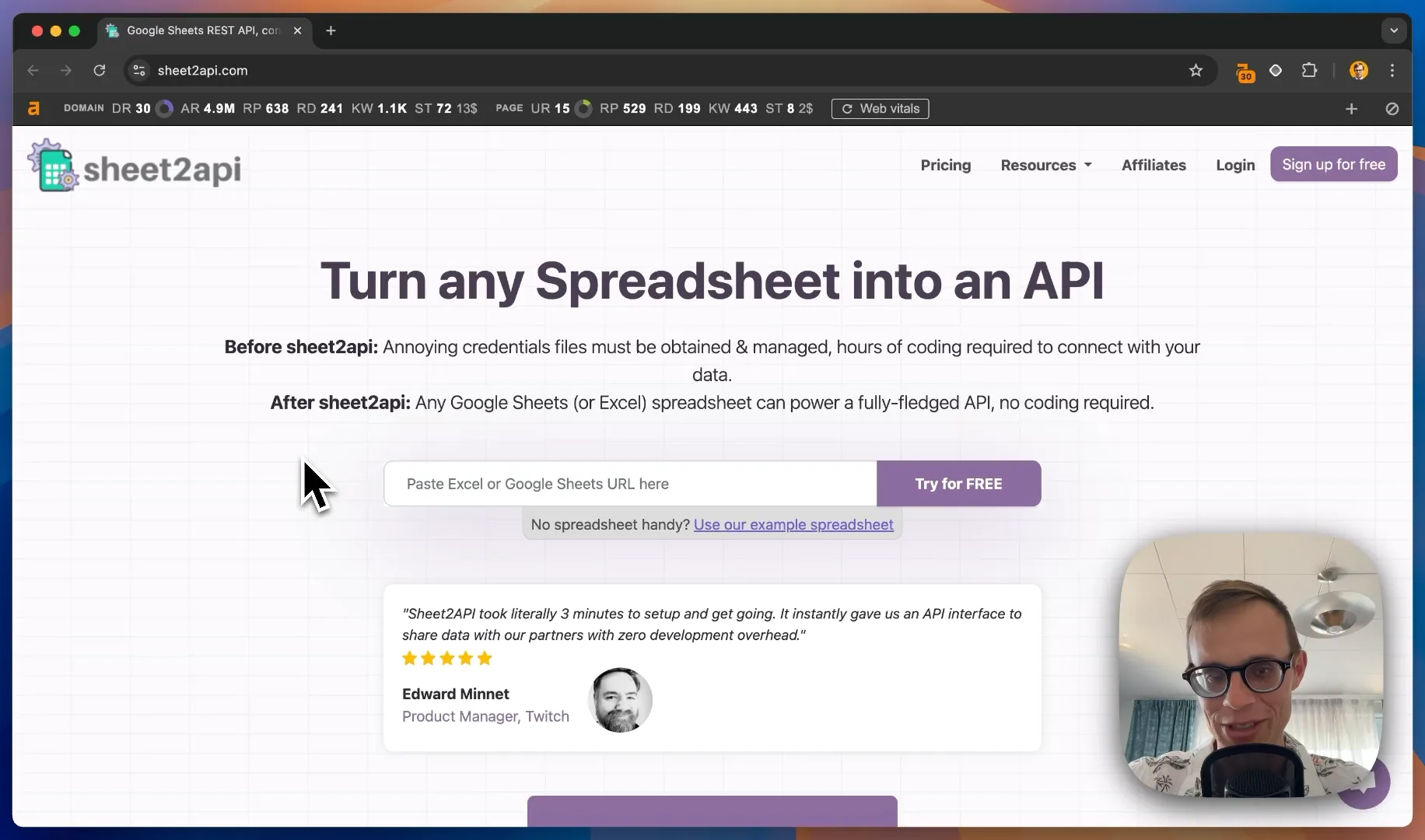
image.png

Sheet2API is a service that turns spreadsheets into APIs.

With a domain rating of 30 and about 240 backlinks, they're currently getting around 72 organic search clicks per month. However, there's significant room for improvement, especially when compared to competitors like SheetsDB and Sheety.io.

On-Page SEO Analysis

Title Tag Optimization
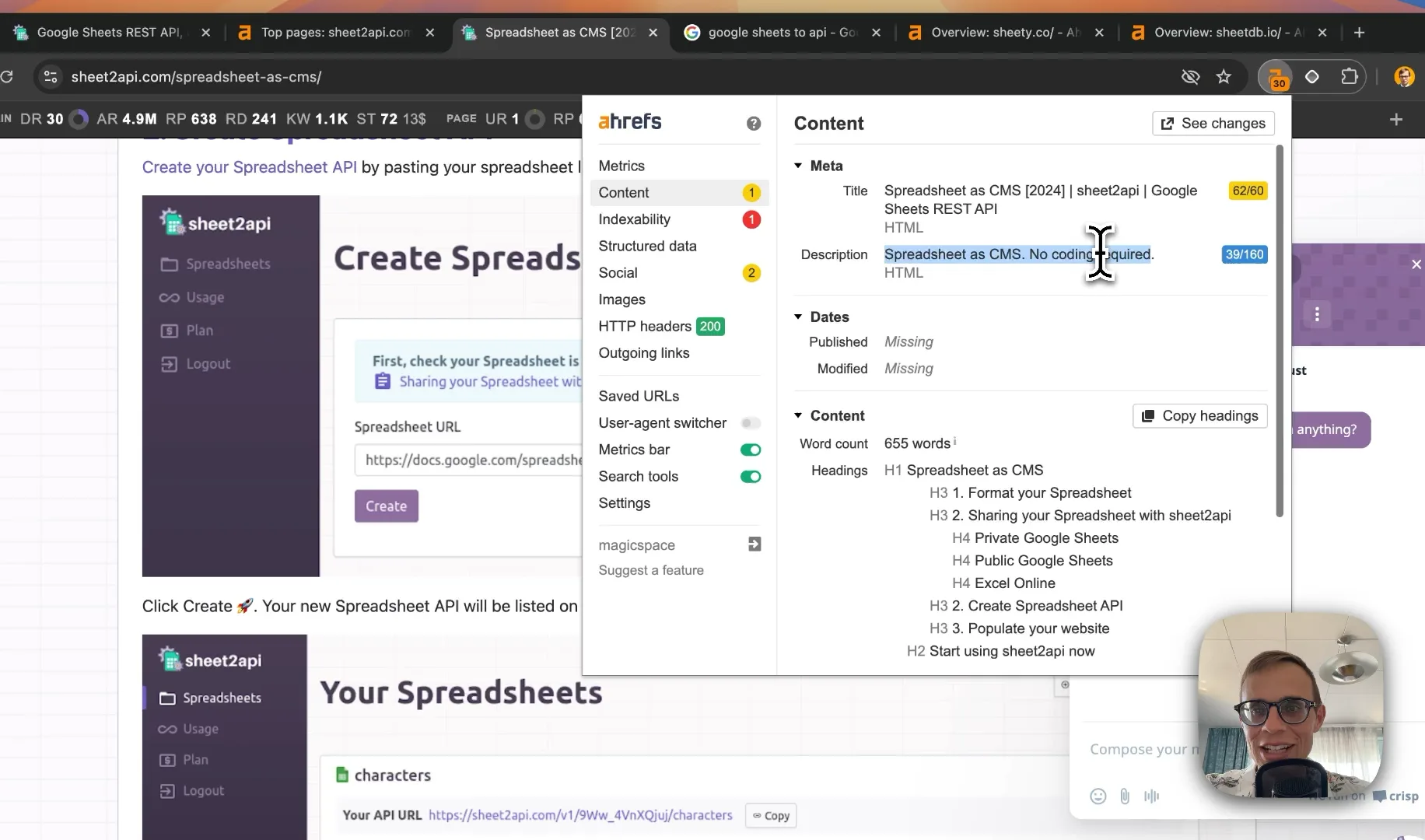
image.png

Current situation: Many pages have overly long title tags, often including redundant information.

Recommendation:

  • Aim for title tags around 60 characters
  • Focus on high-volume keywords
  • Remove redundant suffixes (e.g., "Sheet2API, Google Sheet REST API")
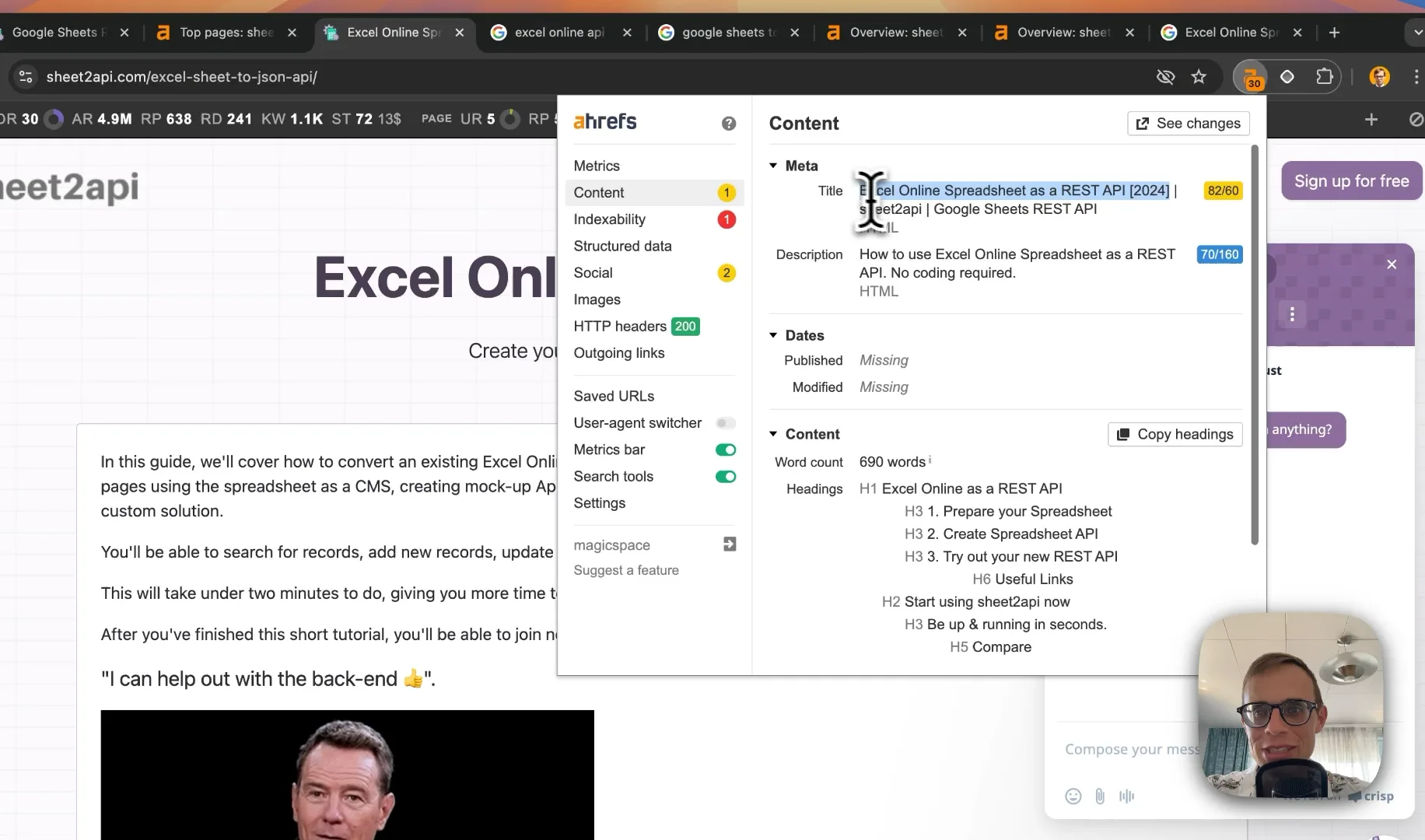
image.png

Example: For the "Excel Online as a REST API" page, consider changing the title to: "Excel Online API: Turn Spreadsheets into REST APIs | Sheet2API"

Blog Post Optimization
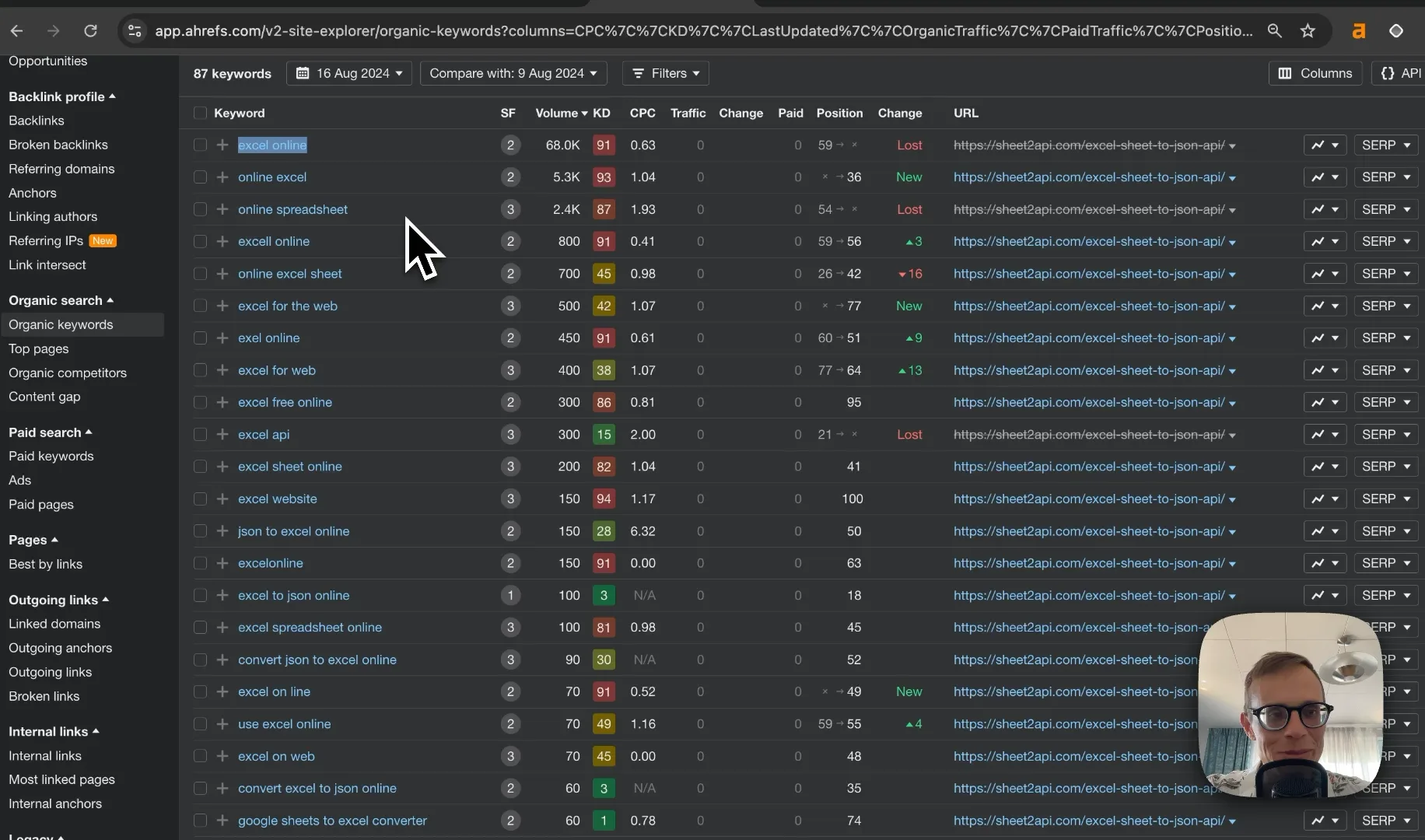
image.png

  1. Use Ahrefs to identify the main keywords each blog post is ranking for
  2. Adjust titles and H1 tags to match high-volume, relevant keywords
  3. Add canonical tags to all pages to prevent duplicate content issues
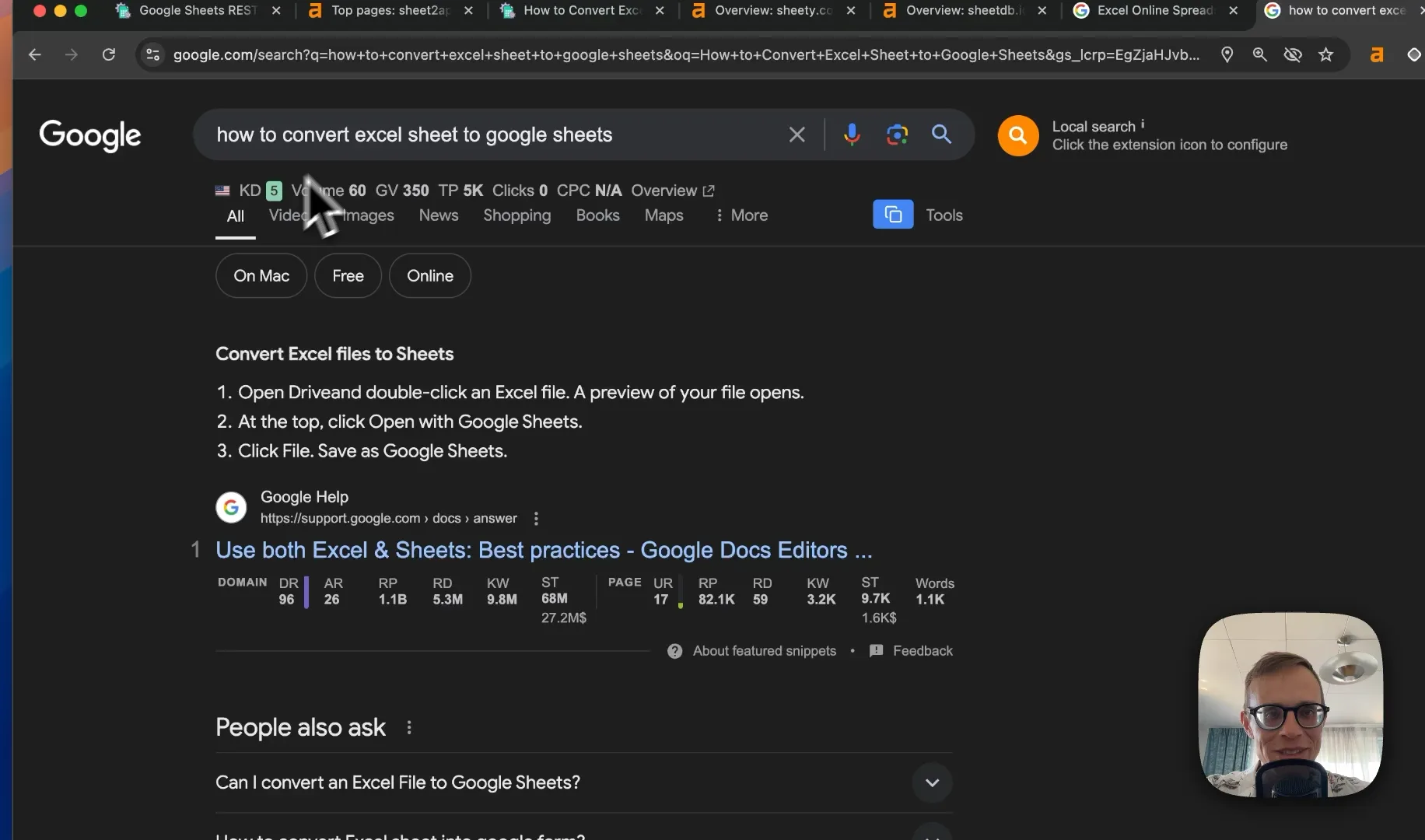
image.png

Tip: For the "How to Convert Excel to Google Sheets" post, consider changing the title to exactly match the high-volume search term: "How to Convert Excel to Google Sheets"

Competitor Analysis
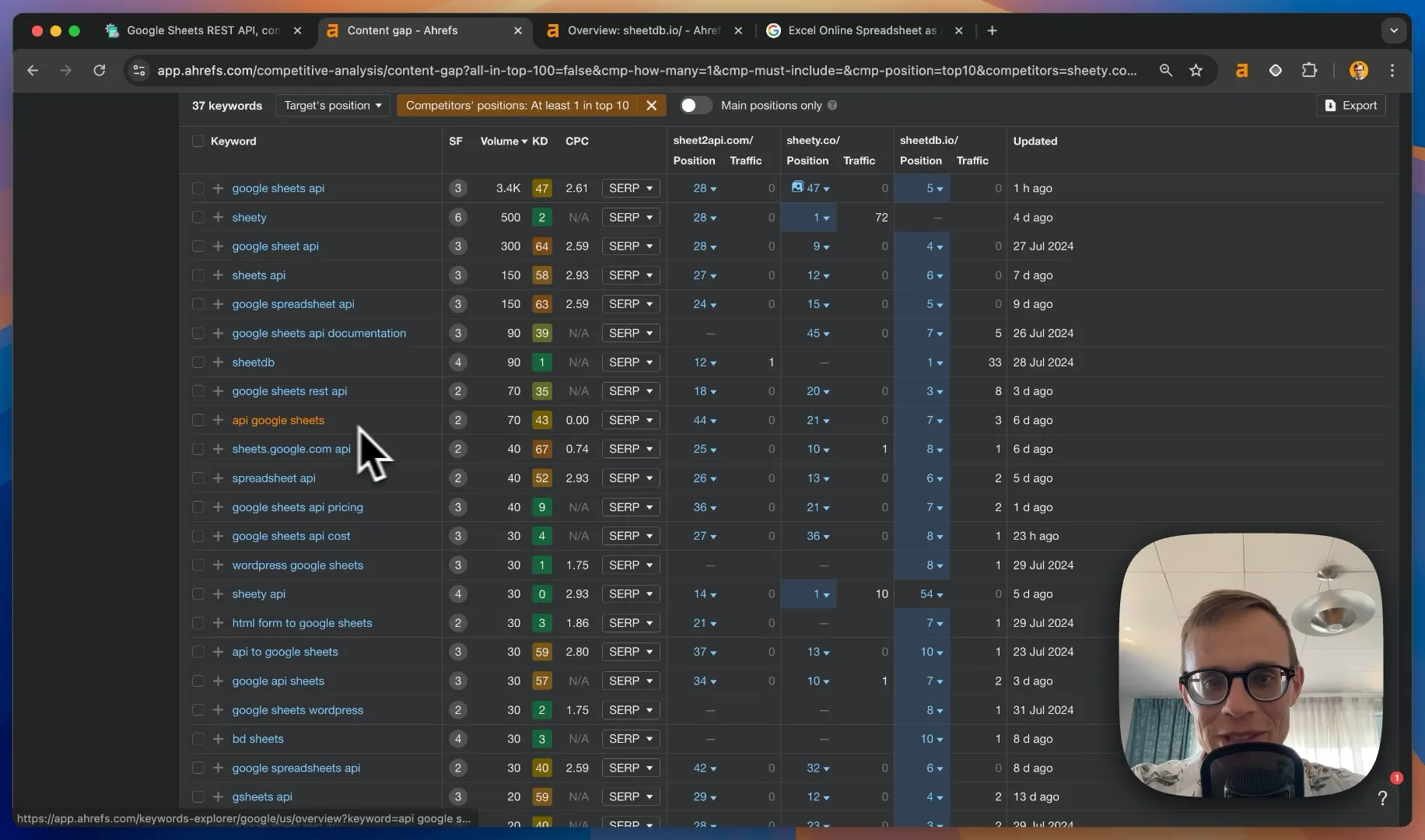
image.png

Key Competitors:

  • SheetsDB.io (DR 47, ~1000 backlinks)
  • Sheety.co (DR 40, similar backlink count to Sheet2API)

Keyword Gap Analysis
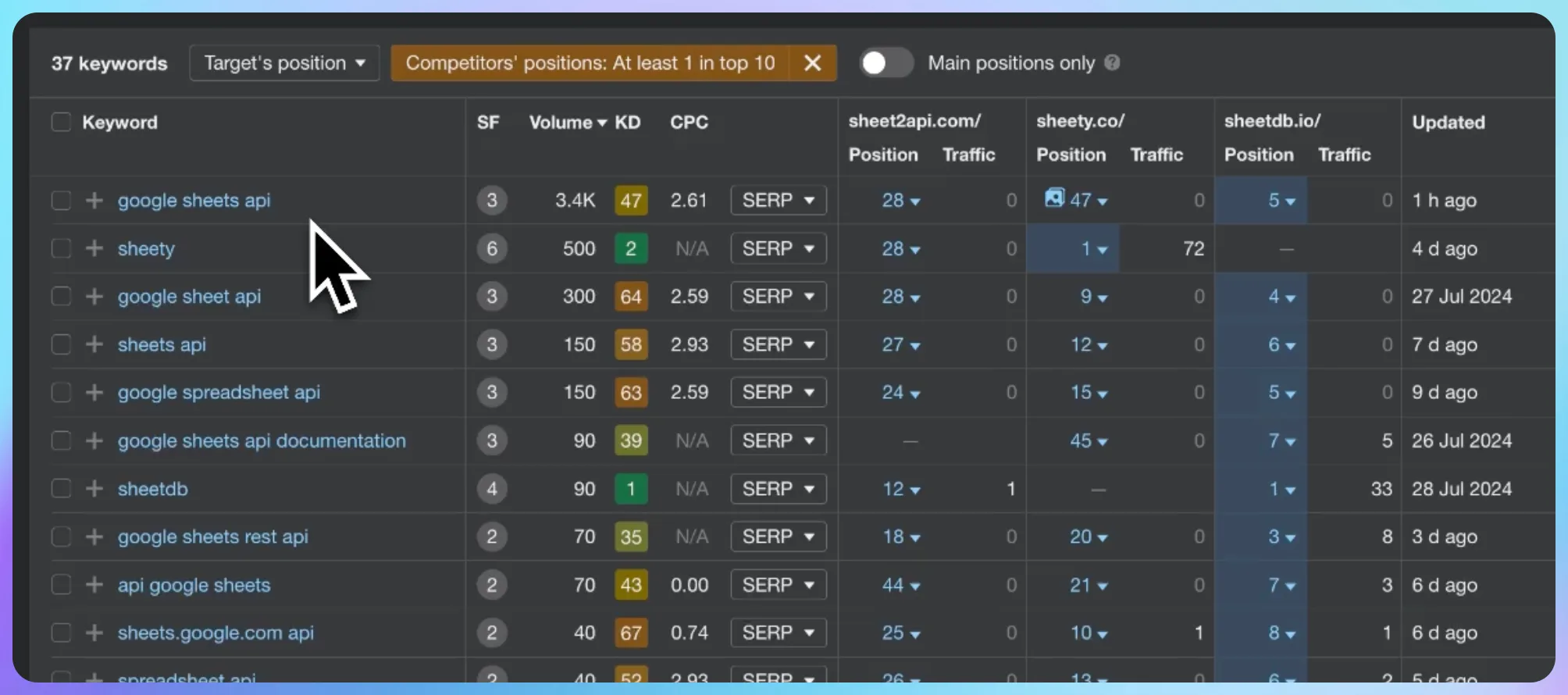
image.png

Use Ahrefs to identify keywords that competitors are ranking for, but Sheet2API isn't. Top opportunities include:

  1. Google Sheets API
  2. Sheets API
  3. Google Spreadsheet API
  4. API for Google Sheets

Action item: Create targeted content for these keywords, optimizing for both search engines and user intent.

Backlink Strategy
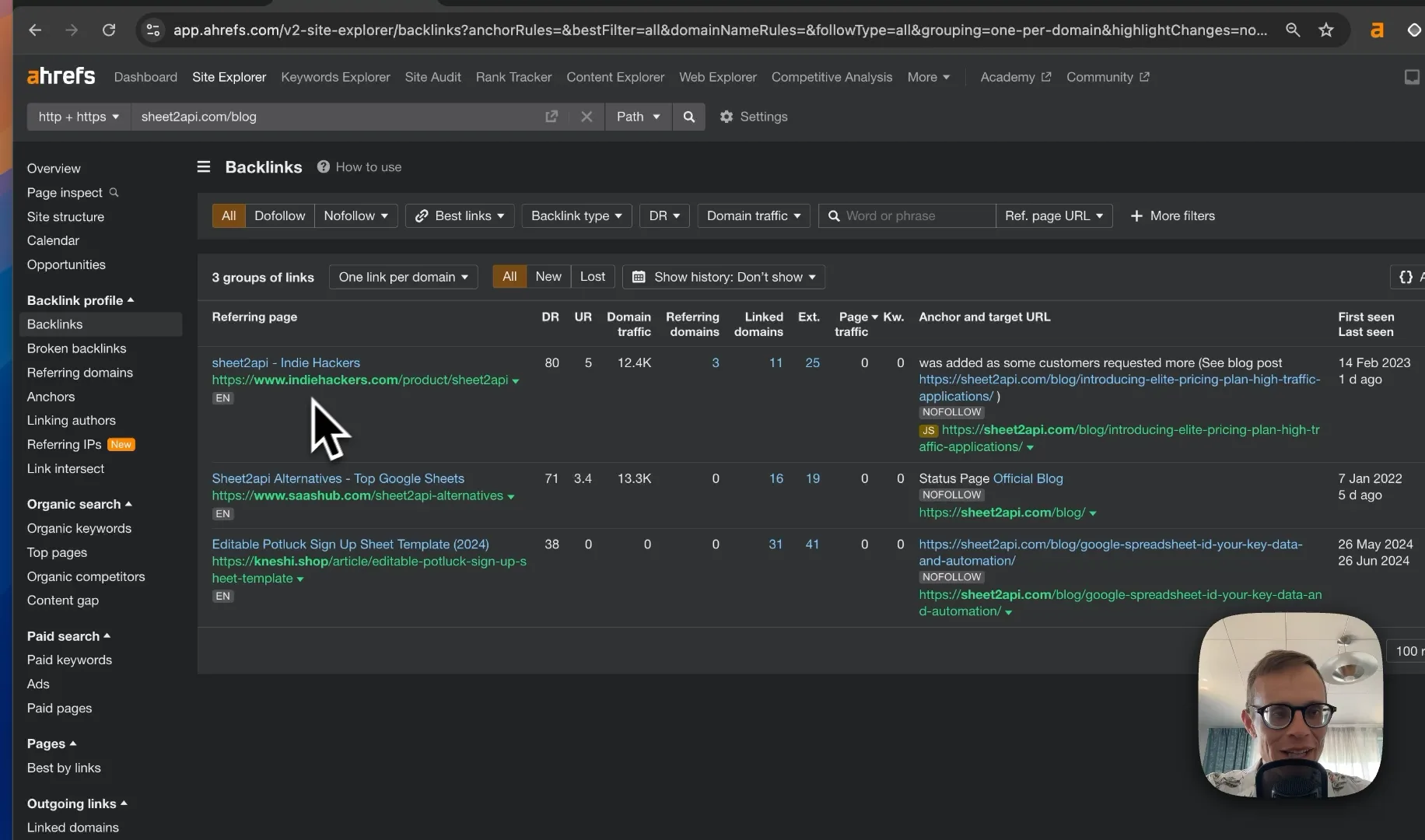
image.png

Current situation: Only 3 backlinks to blog posts (excluding homepage)

Quick Wins:

  1. GitHub Public APIs List: Add Sheet2API to the list at https://github.com/public-apis/public-apis
  2. Stack Overflow: Provide helpful answers related to spreadsheet APIs, including a link to Sheet2API where relevant

Backlink Acquisition:
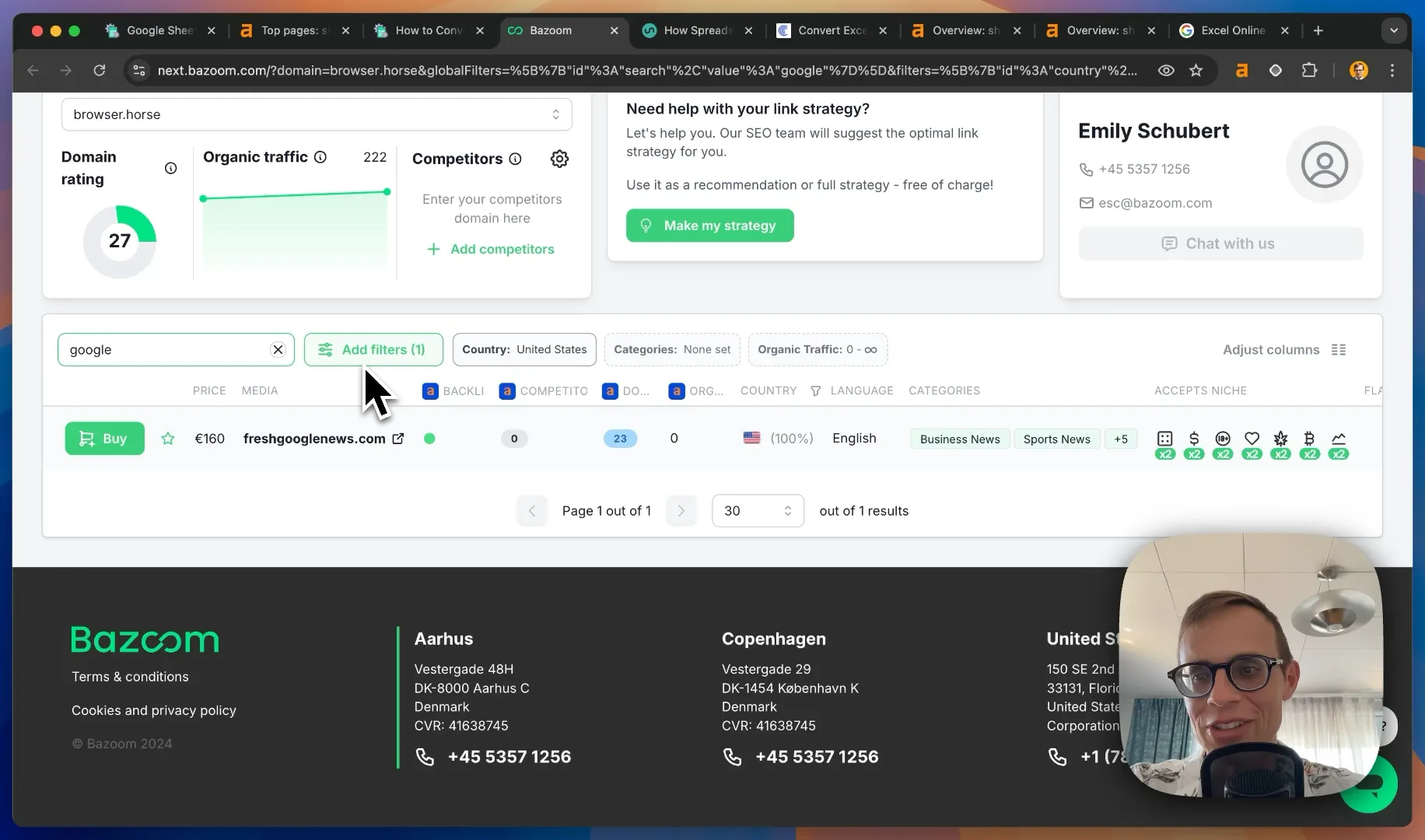
image.png

Consider using these platforms to acquire quality backlinks:

Tip: Focus on acquiring backlinks to specific blog posts and key pages, not just the homepage.

Competitor Client Acquisition Strategy
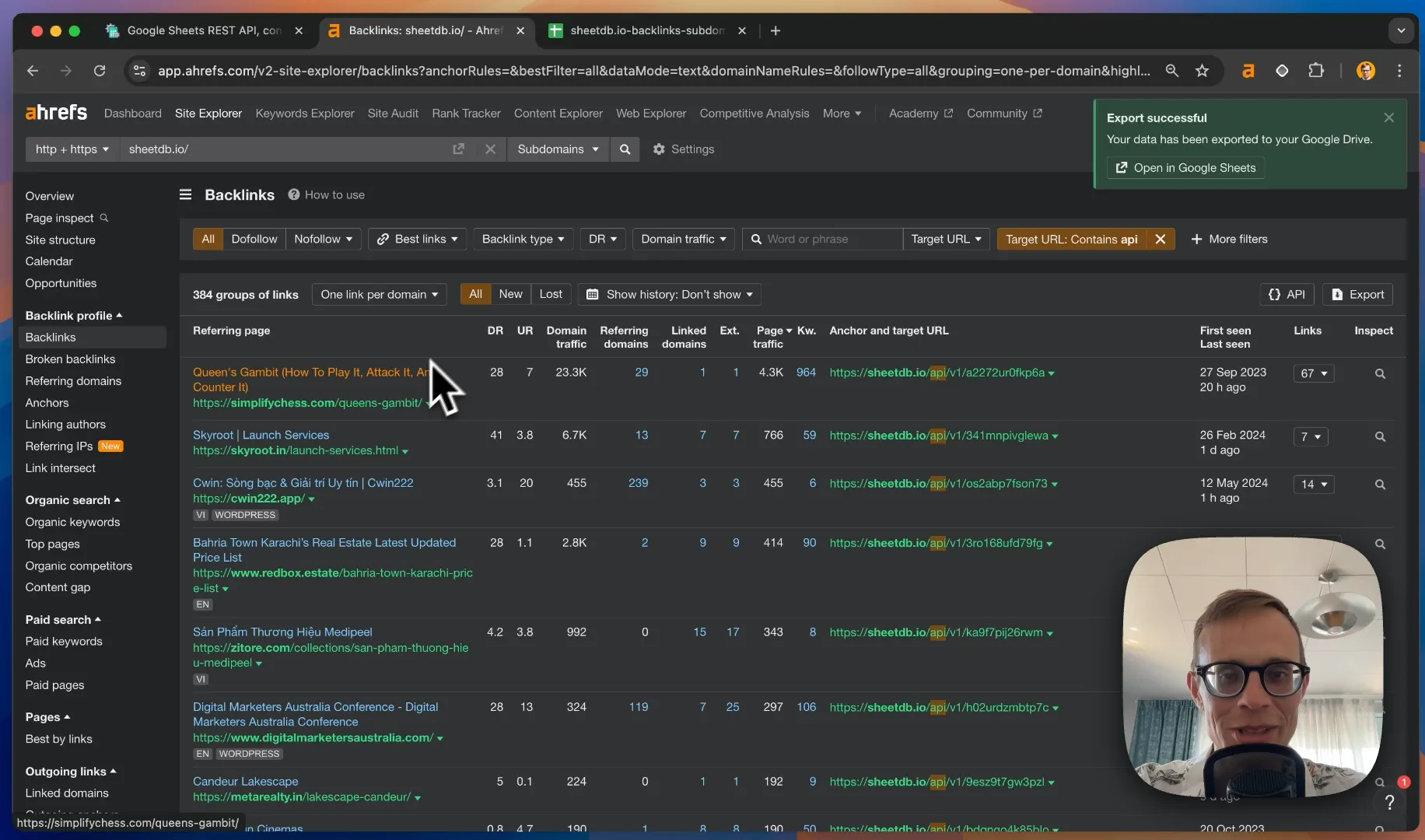
image.png

This is where the "legal stealing" comes in:

  1. Use Ahrefs to export a list of websites using your competitors' APIs
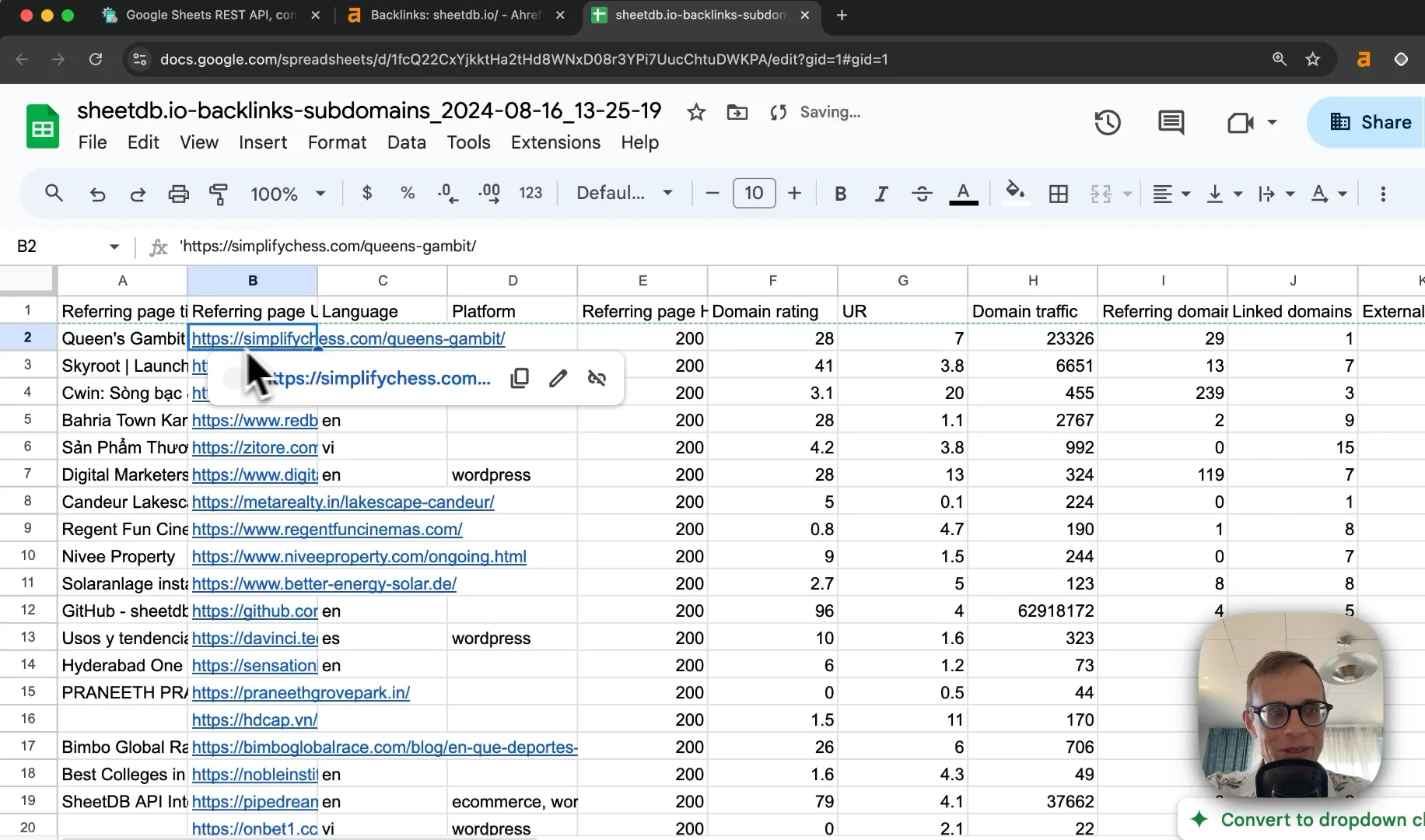
    image.png

  2. Use Hunter.io to find email addresses for decision-makers at these companies
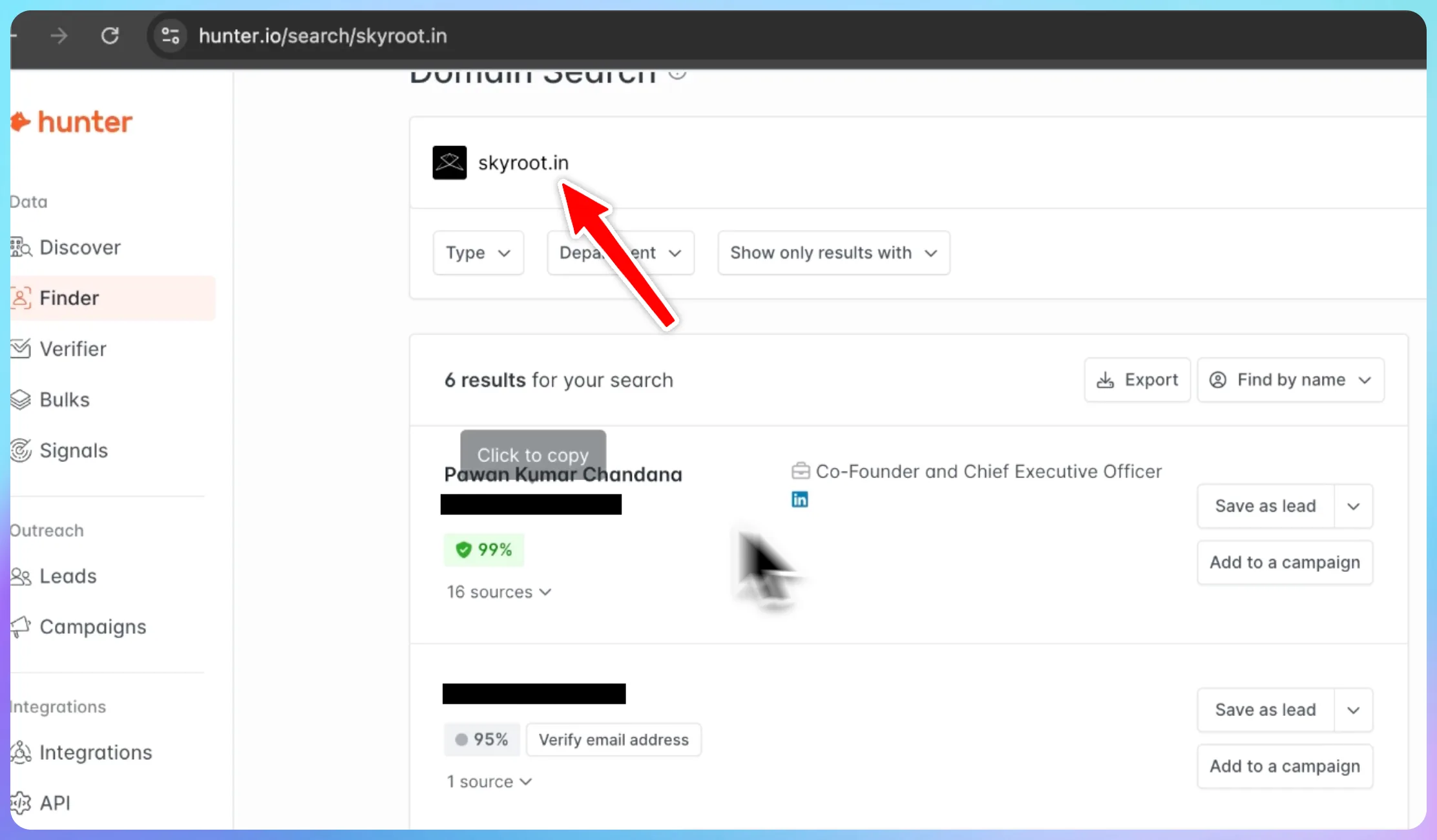
image.png

  1. Craft a personalized cold email campaign:
    • Mention that you noticed they're using a competitor's service
    • Highlight unique features or benefits of Sheet2API
    • Offer a special discount or migration assistance

Email Template Example:

Subject: Upgrade Your Spreadsheet API (Special Offer for [Company Name])

Hi [Name],

I noticed [Company Name] is currently using [Competitor] for your spreadsheet API needs. I wanted to introduce you to Sheet2API, which offers [unique feature/benefit].

We're currently offering a 20% discount and free migration assistance for companies switching from [Competitor]. Would you be interested in seeing how we compare?

Best regards, [Your Name]
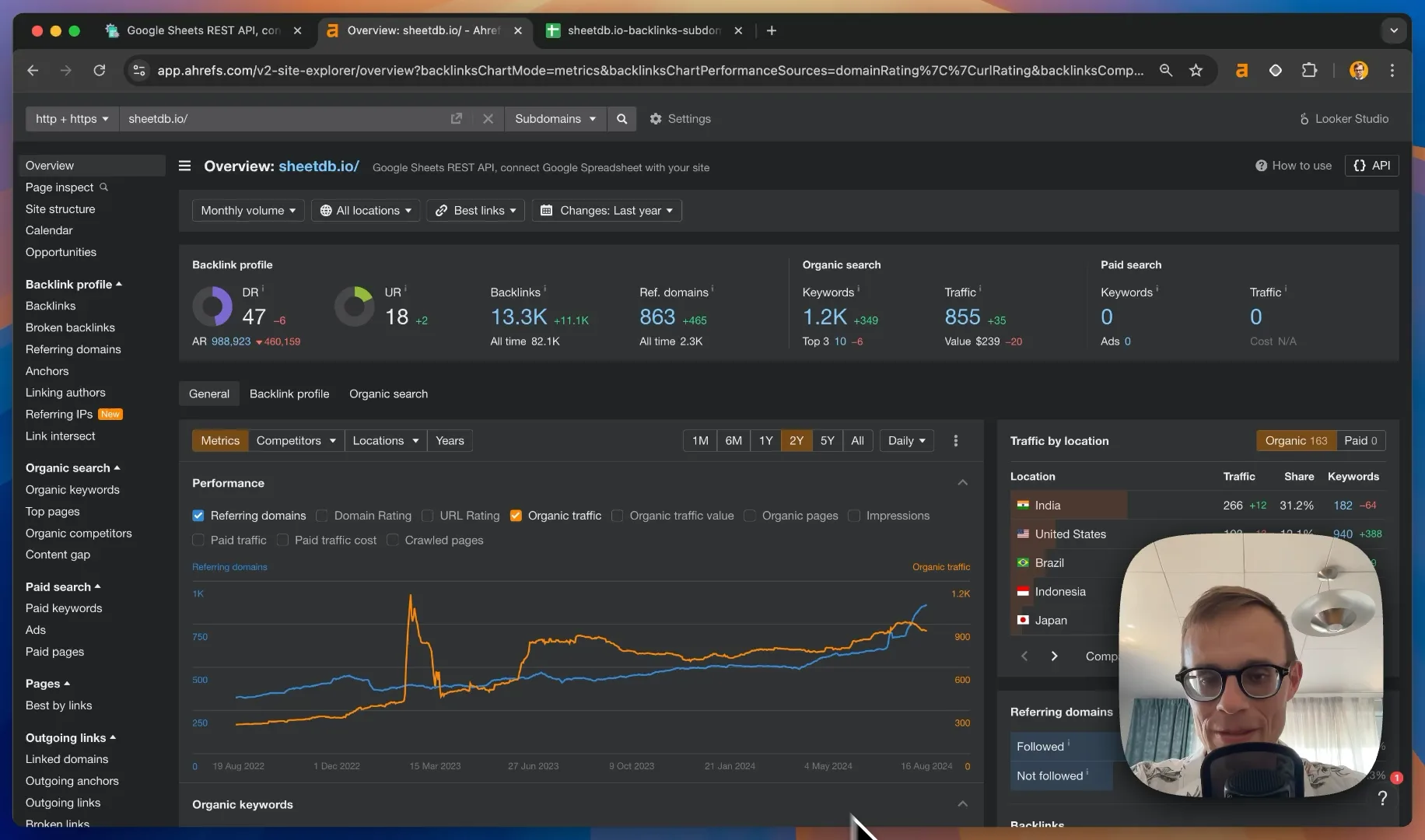
image.png

Video Content Strategy

Create a YouTube video demonstrating how to convert Excel to Google Sheets using Sheet2API.

This can help capture traffic for the high-volume "how to convert Excel to Google Sheets" keyword while showcasing your product.

Final Tips

  1. Regularly update and expand your blog content
  2. Engage with the developer community on platforms like Stack Overflow and GitHub
  3. Consider creating a comparison page: "Sheet2API vs [Competitor]" for each main competitor
  4. Implement structured data on your website to enhance rich snippets in search results
  5. Monitor your backlink profile and disavow any toxic links

By implementing these strategies, Sheet2API can improve its SEO performance, increase organic traffic, and potentially convert some of its competitors' customers. Remember, SEO is a long-term game – consistency and patience are key!