
8 Technical SEO Best Practices for Startups in 2025
Discover the top 8 technical SEO best practices for 2025. Boost your startup's rankings with actionable tips on speed, mobile, schema, and more.

For a startup, being found in search results is essential for growth. While great content and smart link-building are key, your website's technical health makes it all possible. If search engines can't easily crawl, understand, and index your pages, even your best content might never be seen. A weak technical setup is like a roadblock, stopping your audience from finding you.
This guide skips the complex jargon and gives you a clear, simple plan. It's for founders, marketers, and developers who need a strong SEO foundation. We'll cover the 8 most important technical SEO best practices, from site speed and security to structured data. Each point is easy to understand and act on, helping you build a site that's engineered to be discovered.
Think of this as your checklist for a website that both search engines and users will love. We'll cover key areas like:
- Performance: Making your website fast with Core Web Vitals.
- Accessibility: Getting ready for mobile-first indexing and using XML sitemaps.
- Clarity: Using schema markup and managing duplicate content.
- Security & Efficiency: Securing your site with HTTPS and managing your crawl budget.
By focusing on these areas, you create a solid structure that supports all your marketing efforts. This turns your website into a powerful tool for long-term organic growth. Let’s get started.
Stack these next: how to check backlinks in Google · best on-page SEO tools · best backlink analysis tools · keyword research best practices · how to find broken links on a website · profile backlinks · YouTube CTR and AVD · best link-building tools · SaaS SEO strategy · SEO software comparison.
1. Website Speed and Core Web Vitals Optimization
In technical SEO, speed is everything. It directly affects how users experience your site and how you rank in search results. Google's Core Web Vitals (CWV) are key metrics that measure the real-world user experience, focusing on loading speed, interactivity, and how stable the page looks.
Think of a slow website as a shop with a sticky door. Some people will just give up and leave. The data shows this is true: the BBC found they lose 10% more users for every extra second their site takes to load. Making these metrics a priority is a critical part of any good technical SEO strategy.
Understanding the Core Web Vitals
Google uses three main metrics for Core Web Vitals, each showing a different part of the user experience.
- Largest Contentful Paint (LCP): Measures loading speed. For a good user experience, your main content should appear within 2.5 seconds.
- First Input Delay (FID): Measures how quickly the page responds to a click or tap. A good FID is 100 milliseconds or less.
- Cumulative Layout Shift (CLS): Measures visual stability (how much the page jumps around). To provide a good experience, your CLS score should be 0.1 or less.
This infographic shows the ideal performance targets for each Core Web Vital.
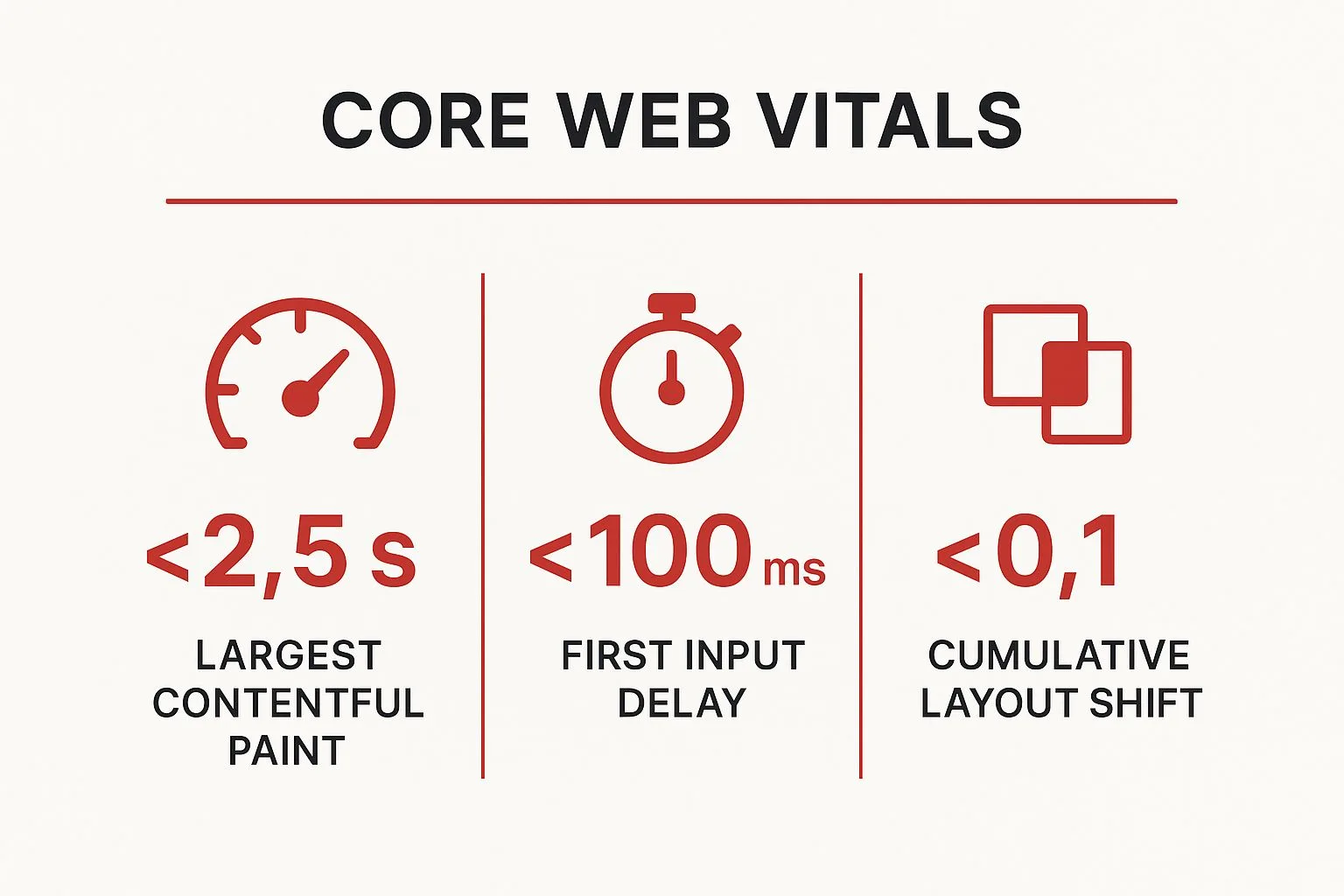
Meeting these targets sends a clear signal to search engines that your site offers a great user experience, which can help your rankings.
Actionable Steps for Optimization
Improving your Core Web Vitals takes a few different steps. Here are some of the most effective things you can do:
- Compress and Optimize Images: Use modern formats like WebP and make sure images are the right size for where they're displayed.
- Minimize CSS and JavaScript: Remove unneeded code, comments, and spaces from your files to make them smaller.
- Leverage Browser Caching: Tell browsers to save parts of your site, so they don't have to be downloaded again on the next visit.
- Implement a Content Delivery Network (CDN): A CDN saves copies of your site in different locations around the world, loading content from the server closest to the user to reduce delay.
- Use Lazy Loading: Only load images and videos when the user scrolls down to them.
To properly optimize your site's speed and track Core Web Vitals, using the best website performance monitoring tools is key. These tools give you the data needed to find problems and see your improvements. To learn more about checking your site's technical health, you can start with our SEO audit template.
2. Mobile-First Indexing and Responsive Design
Today, the mobile experience is the most important one. Mobile-first indexing means Google mainly uses the mobile version of your site for indexing and ranking. Since most people now search on a mobile device, a great mobile site isn't just nice to have—it's a core part of technical SEO.
If your website isn't easy to use on a smartphone, you're ignoring a huge part of your audience. This can cause people to leave your site quickly, which tells search engines it provides a poor experience. As Luke Wroblewski, who championed the "Mobile First" idea, pointed out, designing for mobile first makes you focus on the most important content and features, which helps all users.
Understanding Responsive Design's Role
Responsive web design is the best way to handle mobile-first indexing. It lets one website change its layout to fit any screen size, from a big desktop monitor to a small smartphone.
- Content Parity: This is very important. Your mobile site must have the same content, structured data, and internal links as your desktop site. Hiding content on mobile can hurt your SEO because Google might not see and index it.
- Fluid Grids: Responsive sites use flexible grids that resize elements based on screen size.
- Flexible Images: Images adjust in size to fit the screen and don't break the layout.
- Media Queries: These are rules that apply different styles based on the device's screen size.
A responsive design ensures every user gets a consistent, high-quality experience on any device, which is a strong ranking signal.
Actionable Steps for Optimization
Building a mobile-friendly site requires a clear plan. Here are some of the best things to do for both users and search engines:
- Design for Mobile First: Start your design process with the smallest screen and then expand. This helps you prioritize the most important things.
- Ensure Proper Viewport Meta Tag: Use the
<meta name="viewport" content="width=device-width, initial-scale=1.0">tag to tell browsers how to control the page's size and scale. - Make Tap Targets Accessible: Buttons and links should be big enough to tap easily without mistakes. A size of 48x48 CSS pixels is recommended.
- Test on Real Devices: Browser tools are helpful, but nothing is better than testing your site on actual smartphones and tablets.
- Avoid Intrusive Interstitials: Pop-ups that cover the main content are annoying for mobile users and can lead to a ranking penalty from Google.
3. XML Sitemaps and URL Structure Optimization
Think of your website as a city and search engines as tourists. An XML sitemap is the map you give them, and your URL structure is the street signs. Together, they help search engines find and understand your content efficiently. This is a key part of any good technical SEO strategy.
Without clear guidance, search engine crawlers might miss important pages or get confused about how your site is organized. This can lead to your pages not being indexed, meaning lost ranking opportunities. By providing a logical map, you make it easy for search engines to find all your great content.
The Role of Sitemaps and Clean URLs
An XML sitemap and a logical URL structure work together to make your site easier to crawl and index. They have different but related jobs.
- XML Sitemap: This is a file that lists all the important URLs on your website. You submit it to search engines to tell them which pages matter and when they were last updated.
- URL Structure: This is the format of your web addresses. A clean, descriptive URL helps both users and search engines understand what a page is about before they click it.
For example, a URL like yourstore.com/shoes/mens/running-sneakers is much clearer than yourstore.com/cat?id=58&sub=92. This clarity improves the user experience and helps search engines categorize your content correctly.
Actionable Steps for Optimization
Following best practices for sitemaps and URLs is a simple but powerful technical SEO task. Here are the most effective actions you can take:
- Keep URLs Short and Descriptive: Include relevant keywords and make them easy to read. For example, use
/technical-seo-best-practices/instead of/p-123/. - Use Hyphens to Separate Words: Use hyphens (-) instead of underscores (_) in URLs, because search engines see hyphens as word separators.
- Generate and Submit an XML Sitemap: Most modern platforms like WordPress can create one automatically. Once it's ready, submit it to Google Search Console and Bing Webmaster Tools.
- Include Only Canonical URLs: Your sitemap should only list the main, indexable versions of your pages to avoid confusion about duplicate content.
- Keep Sitemaps Updated: Make sure your sitemap updates automatically when you add, remove, or change content.
- Split Large Sitemaps: If you have more than 50,000 URLs, break your sitemap into smaller files (e.g., by category) and list them in a sitemap index file.
4. Schema Markup and Structured Data Implementation
Schema markup, also known as structured data, is a type of code you add to your website's HTML. It helps search engines like Google understand the meaning and context of your content, not just the keywords. This deeper understanding allows them to show your content in more interesting ways in search results, known as rich results.
Think of schema as a detailed business card for your webpage. Instead of just telling Google your name (the content), you're giving them your job title, contact info, and what you do (the context). This clarity is a key part of advanced technical SEO because it can improve how your site looks in search results, potentially leading to more clicks and visibility.

Why Schema Matters
Using structured data isn't a direct ranking factor, but it offers clear benefits. By helping search engines understand your content, you can get rich results like star ratings, prices, FAQs, and event details shown directly in the search listings. These enhanced results stand out on the page, making your listing more attractive and often leading to more organic traffic. For example, a recipe with schema can show cooking time and ratings, while a product page can display its price and if it's in stock.
Actionable Steps for Implementation
Getting started with schema markup is easier than it seems. Here’s a clear guide:
- Identify Key Schema Types: Start with the schema that gives the most value for your content. Common types include
Article,Product,Recipe,LocalBusiness, andFAQPage. - Use JSON-LD Format: Google recommends using JSON-LD. You place it in a
<script>tag in your page's code. This keeps it separate from your regular HTML and makes it easier to manage. - Generate and Test Your Markup: You don't have to write schema from scratch. Use tools like Google's Structured Data Markup Helper to create the code. Always check it with the Rich Results Test tool before putting it on your site.
- Ensure Accuracy and Completeness: The information in your schema must match the content on the page. Incorrect or misleading markup can lead to a penalty from Google.
- Monitor Performance: After you add schema, use Google Search Console to see how your rich results are doing. The "Enhancements" report will show any errors and track which pages are getting rich snippets.
5. HTTPS Security and SSL Certificate Management
Today, website security is essential. HTTPS (HyperText Transfer Protocol Secure) encrypts the data sent between a user's browser and your website, protecting sensitive information. This security is a vital part of technical SEO, as Google uses it as a ranking signal and browsers like Chrome warn users about non-secure HTTP sites.
Think of HTTPS as a sealed, tamper-proof envelope for your website's data. It tells visitors their connection is private and secure, which builds trust. For example, e-commerce sites often see more sales after switching to HTTPS because customers feel safer sharing payment details. This focus on trust is why HTTPS is one of the most basic technical SEO best practices.

The Importance of SSL/TLS Certificates
To use HTTPS, you need an SSL (Secure Sockets Layer) or TLS (Transport Layer Security) certificate on your server. This digital certificate confirms your website's identity and creates the encrypted connection. The good news is that getting a certificate is easier than ever, with services like Let's Encrypt offering them for free.
- User Trust: The padlock icon in the browser address bar is a strong visual sign that your site is safe.
- Ranking Signal: While it's a small signal, HTTPS can give you an edge in search results.
- Data Integrity: It stops others from changing the data as it travels between your site and your users.
Not using HTTPS harms user trust and can hurt your organic traffic, as search engines favor secure, user-friendly sites.
Actionable Steps for Implementation
Moving your site from HTTP to HTTPS properly involves more than just installing a certificate. A careful approach is needed to avoid common SEO issues.
- Install an SSL/TLS Certificate: Get and install a certificate on your web server. Many hosting providers offer easy, one-click installations.
- Implement 301 Redirects: Set up permanent 301 redirects to send all traffic from your old HTTP URLs to the new HTTPS versions.
- Update Internal Links and Resources: Check your website's code to update all internal links, images, and scripts to use HTTPS paths. This prevents "mixed content" warnings where insecure items load on a secure page.
- Update Your XML Sitemap: Make sure your sitemap lists the HTTPS versions of your URLs and resubmit it to Google Search Console.
- Enable HSTS (HTTP Strict Transport Security): This is an advanced security setting that tells browsers to only use HTTPS when connecting to your site. This improves security and speeds things up after the first visit.
Managing your SSL certificate and HTTPS setup is a key step in building a technically strong website. To learn more about site structure, understanding different website structures and their SEO impact can be very helpful. Likewise, making sure your entire site is secure and well-organized is a key part of the local SEO audit checklist for businesses with a physical location.
6. Crawl Budget Optimization and Robots.txt Management
Crawl budget is the number of pages a search engine bot, like Googlebot, will crawl on your site in a certain period. For large websites with thousands of pages, this budget is limited. Good crawl budget optimization makes sure that search engines spend their time crawling your most important pages, not low-value or duplicate ones.
Think of it like giving a tour guide a map of a huge museum with limited time. You'd want them to see the best exhibits, not get lost in the gift shop. Managing your crawl budget with files like robots.txt is how you give that clear map to search engines. This is a critical part of technical SEO, especially for large websites.
Understanding Crawl Budget and Robots.txt
Your robots.txt file is a text file at the root of your domain that gives instructions to web crawlers. It tells them which pages or sections they should not crawl. A well-made robots.txt is your first step in protecting your crawl budget.
- Crawl Budget: This isn't a fixed number. It's based on a site's size, health (how many errors it has), and authority. A healthy, popular site usually gets a larger crawl budget.
- Robots.txt Directives: The two main commands are
User-agent, which names the bot, andDisallow, which tells the bot not to crawl a certain URL path. For example, blocking/cart/on an e-commerce site stops bots from wasting time on thousands of unique shopping cart pages.
Guiding crawlers correctly helps them find your high-quality content faster, which can lead to quicker indexing and better search performance.
Actionable Steps for Optimization
Optimizing your crawl budget is an ongoing process. Here are the most effective actions you can take:
- Audit Your Server Logs: Check your server logs to see which pages Googlebot is visiting, how often, and if it's wasting time on unimportant URLs.
- Block Low-Value Pages: Use your
robots.txtfile to block crawlers from admin pages, internal search results, shopping carts, and other areas that have no SEO value. - Manage URL Parameters: Stop crawlers from accessing thousands of duplicate pages created by URL parameters (for sorting or filtering) by blocking them in
robots.txtor using tools in Google Search Console. - Fix Broken Links and Redirects: A lot of 404 errors (Not Found) or long redirect chains can use up your crawl budget. Regularly check for and fix these issues.
- Use XML Sitemaps Strategically: Your sitemap should only list your most important, indexable pages. A clean sitemap helps guide Googlebot directly to your best content.
By managing how search engines interact with your site, you ensure your most important content gets the attention it deserves.
7. Canonical Tags and Duplicate Content Management
On the internet, duplicate content is like having multiple copies of the same book with different covers. It confuses search engines, making them guess which version is the original. This weakens your ranking potential. Canonical tags (rel="canonical") are the technical SEO fix for this problem. They tell search engines which version of a page is the main one you want them to index.
For example, an e-commerce store might have a product available at example.com/shirts/blue-shirt, example.com/shirts?color=blue, and example.com/featured/blue-shirt. Without a canonical tag, a search engine sees three identical pages and splits any ranking value between them. By putting a canonical tag on all three versions that points to the main URL, you combine their value into one, preventing them from competing with each other.
Understanding How Canonical Tags Work
A canonical tag is a simple line of HTML code in the <head> section of a webpage. It tells search engines, "This page has content that is very similar to another page. Please consider that page the main one for ranking."
- Consolidates Link Signals: All the authority from duplicate URLs is passed to the one canonical URL.
- Manages Syndicated Content: If other sites republish your articles, a canonical tag pointing back to your original post makes sure you get the SEO credit.
- Controls Crawl Budget: It helps Googlebot crawl your new or updated pages more efficiently instead of wasting time on duplicate versions.
Using canonical tags correctly is a basic part of keeping your site structure clean and efficient, which is a core idea of technical SEO.
Actionable Steps for Implementation
It's important to manage canonical tags correctly to avoid problems. Here are the key steps to follow:
- Use Absolute URLs: Always use the full URL, including
https://www, in your canonical tags (e.g.,https://www.example.com/page/) to be clear. - Implement Self-Referencing Canonicals: Every page that is the original version of its content should have a canonical tag pointing to itself. This clearly marks it as the main source.
- Avoid Mixed Signals: Don't point a canonical tag to a URL that is blocked by
robots.txtor has a "noindex" tag. This sends confusing messages to search engines. - Don't Use Canonicals for Pagination: It's wrong to make all paginated pages (page 2, 3, etc.) point to the first page. This hides the content on the other pages from search engines.
- Use 301 Redirects for Retired Pages: If a page is permanently moved or deleted, use a 301 redirect, not a canonical tag. A canonical tag is for live, duplicate pages.
Checking your canonical tag setup is a key part of any technical site audit. To make sure your tags are set up right across your site, you can learn more about how to perform a comprehensive SEO audit.
8. Internal Linking Strategy and Site Architecture
A strong site architecture is like a well-organized library, making it easy for both users and search engines to find what they need. Smart internal linking is like the library's catalog system; it creates logical paths, connects related content, and tells search engines which pages are most important. This is a basic part of technical SEO because it controls how "ranking power" flows through your site.
Think of it this way: a page with many internal links pointing to it seems more important to Google. Without a clear linking plan, your most valuable pages can be left isolated, making them hard for search engines to find and rank. HubSpot's topic cluster model is a great example, where a main "pillar" page links to and from many related "cluster" articles, building strong topical authority.
Key Components of a Strong Architecture
A well-structured site is built on clear connections between pages. This is done through careful planning and consistent linking.
- Logical Hierarchy: Your site should have a clear, pyramid-like structure. The homepage is at the top, followed by main categories, and then individual pages. This makes it easy for users to navigate and for search engines to crawl.
- Topical Relevance: Group related content together. Linking between articles on similar subjects helps establish your site as an expert on that topic and keeps users engaged.
- Link Equity Distribution: Internal links pass authority from one page to another. A good internal linking strategy makes sure your most important pages get enough authority from other strong pages on your site, boosting their ranking potential.
Actionable Steps for Optimization
Building a good internal linking structure is an ongoing process. Here are some of the best ways to create and maintain your site's architecture:
- Create Topic Clusters: Build main "pillar" pages for your core topics and link them to and from related, more specific "cluster" content.
- Use Descriptive Anchor Text: Use keyword-rich anchor text that clearly describes the page you're linking to. Avoid generic phrases like "click here."
- Keep Important Pages Close: Make sure your most important pages are no more than three clicks away from the homepage.
- Audit Your Links: Regularly check your internal links to find and fix broken links and look for new linking opportunities.
- Implement Breadcrumbs: Add breadcrumb navigation to show users where they are on your site. This also adds more internal links.
To improve your site's structure and spread authority, understanding a good internal linking strategy is essential. To help find linking opportunities on your site, you can use special tools to find relevant link insertion spots.
Technical SEO Best Practices Comparison
| Item | Implementation Complexity 🔄 | Resource Requirements ⚡ | Expected Outcomes 📊 | Ideal Use Cases 💡 | Key Advantages ⭐ |
|---|---|---|---|---|---|
| Website Speed and Core Web Vitals Optimization | High – requires continuous monitoring and dynamic content handling | Moderate to high – CDN, caching, compression tools | Improved page load, user experience, and rankings | Sites needing SEO boost and user engagement | Direct Google ranking factor; better conversions |
| Mobile-First Indexing and Responsive Design | Medium to high – redesign may be needed for legacy sites | Moderate – development and device testing | Seamless cross-device UX; better mobile rankings | Mobile-heavy traffic sites; future-proofing web presence | Single URL for all devices; improved usability |
| XML Sitemaps and URL Structure Optimization | Low to medium – routine updates and sitemap management | Low – automated tools available | Faster indexing; better crawl efficiency | Large or complex sites needing indexing speed | Clear site structure communication to search engines |
| Schema Markup and Structured Data Implementation | Medium – requires precise coding and ongoing updates | Low to moderate – mainly developer time | Enhanced rich snippets; higher CTR | Sites wanting rich results and voice search optimization | Competitive appearance in search results |
| HTTPS Security and SSL Certificate Management | Medium – initial setup and certificate renewals | Low to moderate – certificates and hosting support | Increased trust, security, and ranking boost | All websites handling data or prioritizing security | User trust; mandatory for HTTP/2 and modern features |
| Crawl Budget Optimization and Robots.txt Management | Medium – careful configuration and ongoing monitoring | Low to moderate – analysis tools and expertise | Efficient crawling; faster indexing of key pages | Large sites with many pages and dynamic content | Saves server resources; better crawl focus |
| Canonical Tags and Duplicate Content Management | Medium – technical implementation across pages | Low – mainly developer time | Prevents duplicate penalties; consolidates ranking | Sites with parameterized URLs or syndicated content | Preserves SEO equity; reduces crawl waste |
| Internal Linking Strategy and Site Architecture | Medium to high – ongoing maintenance and strategy application | Moderate – content and SEO strategist involvement | Improved page authority distribution and UX | Content-heavy and large sites improving navigation | Boosts relevance and rankings; enhances UX |
Moving From Plan to Action
We've covered the landscape of technical SEO best practices, from essentials like site speed and mobile design to more advanced strategies like crawl budget and structured data. This journey through eight key areas—from Core Web Vitals to internal linking—provides a clear plan for building a website that search engines can easily understand and favor.
The one thing connecting all these practices is control. Mastering technical SEO means you are no longer just hoping for search visibility; you are actively shaping how search engines see your site. It's about creating a clean, efficient, and trustworthy foundation that lets your great content shine. You are essentially rolling out the red carpet for search engine crawlers, making sure they can find, understand, and index your most important pages easily.
Synthesizing Your Technical SEO Strategy
It's easy to look at this list and feel overwhelmed. The key is to see it not as a giant checklist, but as a roadmap. Your first step isn't to fix everything at once. It's to figure out where your biggest opportunities are.
Consider these takeaways as you make your plan:
- Foundation First: Issues with site speed (Core Web Vitals), mobile-friendliness, and HTTPS security are non-negotiable. They directly impact user experience and search engine trust, making them your top priority. A slow, insecure, or broken mobile site will ruin all your other SEO efforts.
- Guidance is Critical: Your XML sitemap,
robots.txtfile, and canonical tags are how you talk directly to search engines. Getting these right prevents indexing problems, stops duplicate content issues, and ensures crawlers focus on your most valuable pages. - Structure Creates Clarity: A logical URL structure, a smart internal linking plan, and schema markup all work together to build a clear site architecture. This helps search engines understand the relationships between your pages, see your site as an authority, and show your content more effectively in search results.
Think of your website like a library. Technical SEO is the work of making sure the building is safe and accessible (HTTPS, mobile-friendly), the lighting is good (site speed), the catalog is accurate (sitemap), and the books are organized logically on the shelves (site architecture, internal links, schema). Without this organization, even the best books will never be found.
Your Actionable Next Steps
Mastering the technical SEO best practices we've covered is a continuous process of auditing, implementing, and monitoring. It’s not a one-time task. Search engine algorithms change, new technologies appear, and your own website will grow.
Here’s a simple plan to get started:
- Perform a Comprehensive Audit: Use tools like Google Search Console, PageSpeed Insights, and a site crawler (like Screaming Frog) to get a baseline. Find your biggest problem areas. Are your Core Web Vitals poor? Do you have thousands of duplicate title tags? Is your schema markup missing or wrong?
- Prioritize by Impact: Make a simple list of all the issues you find. Add two columns: "Effort" (how hard is it to fix?) and "Impact" (how much will this help our SEO?). Start with the low-effort, high-impact items to get some quick wins.
- Integrate Into Your Workflow: Technical SEO should not be an afterthought. Make it a part of your development and content creation process. When you launch a new feature, check if it works on mobile. When you publish a new blog post, make sure its schema is correct and internal links are added.
By consistently applying these principles, you turn your website from a simple collection of pages into a strong, high-performing asset. You build a solid foundation that turns search engines from an unpredictable source of traffic into a reliable growth channel for your business.
Tired of guessing which technical issues are holding your site back? An expert audit can provide the clarity you need. At SEO Roast, we deliver a high-signal, actionable video audit that diagnoses these critical technical SEO problems and gives you a prioritized plan to fix them, turning your website into a powerful engine for organic growth. Get your personalized SEO Roast today.