
Mastering Site Architecture and SEO
A founder's guide to mastering site architecture and SEO. Learn how to build a website that drives traffic, engages users, and fuels startup growth.


Ever tried building a house without a blueprint? You’d get hallways to nowhere and a lot of confusion. That's what building a website without a plan is like. Good site architecture and SEO are the digital blueprint for your site, creating a clear structure that guides both users and search engines where you want them to go.
Why Your Website Blueprint Is Your SEO Foundation
For a startup, a solid site structure is a must-have. It’s the invisible framework that decides how easily Google can find, understand, and rank your most important pages. Without it, you're just putting content online and hoping for the best.
A well-planned structure also creates a great user experience, which is a big signal to search engines. When visitors can find what they need easily, they stay longer. That behavior tells Google your site is helpful, which can lead to higher rankings.
The Cost of a Poor Foundation
Ignoring your site's structure early on creates problems later. It's like a messy filing cabinet. You can handle a few misplaced folders at first, but with hundreds, finding anything is a nightmare. A disorganized website is the same—it gets much harder and more expensive to fix as it grows.
Starting with a logical plan from day one avoids this chaos. It gives you a strong foundation for future content, making sure every new blog post or service page has a clear place in your site's hierarchy.
A great website structure does more than just organize content; it channels authority. When important pages like your homepage earn links from other sites, a smart internal linking structure shares that power with other pages, lifting the entire site's performance.
This strategic approach turns a website from a confusing maze into a powerful tool for growth.
Connecting Architecture to Business Goals
Ultimately, the goal of site architecture and SEO is to make your most important content easy to find. For a startup, this means your core product, service, and solution pages should only be a few clicks from the homepage. The ideal setup is a "flat" architecture, where no key page is more than 3-4 clicks deep.
This approach achieves two key goals at once:
- For Users: It creates a simple, intuitive path for them to take action, like signing up for a trial or asking for a demo.
- For Search Engines: It shows which pages are most important, helping them efficiently find and index the content that drives your business.
Getting this right from the start is one of the most effective things a founder can do. It lays the groundwork for steady organic growth and ensures your website is built to last.
How Google Sees Your Website

To build a site that ranks, you have to understand how Google works. Google doesn't browse your website like a person. Instead, it sends out automated programs—often called "spiders" or "crawlers"—to explore it.
These bots have two main jobs: crawling and indexing.
Think of crawling as a discovery mission. Spiders follow links from page to page to map out the web and find new content.
Once they find a page, they index it. This is like a librarian taking a new book, figuring out what it's about, and putting it on the right shelf in a giant library. Your site architecture is the map you give the librarian to make sure your book goes exactly where it belongs.
What is Crawl Budget and Why Does It Matter?
Even Google has limits. It dedicates a certain amount of time and resources to exploring any single website. This is known as the crawl budget.
If you have a small site, you probably don't need to worry about this. But as your site grows, it becomes very important.
A messy, disorganized site wastes your crawl budget. Spiders might get stuck in loops, hit dead ends, or spend time crawling unimportant pages, like your privacy policy. This means your most important pages—the ones that help your business—might get crawled less often, or not at all.
Good site architecture and SEO helps you spend this budget wisely. You want Google's crawlers to focus on the pages that matter most to your business.
How Links Guide Google’s Spiders
Links are the roads Google’s crawlers use to navigate your site. Internal links—the ones connecting pages on your own website—create your site’s internal map. Without them, pages become isolated islands that are invisible to search engines.
External links (backlinks) from other sites are also a huge factor. When a reputable site links to you, it’s a powerful vote of confidence. In fact, studies show that 96% of websites in the top 10 search results have more than 1,000 links from different websites. They are a major signal for both discovery and authority.
A well-planned site architecture acts like a traffic director for Google's bots. It guides them efficiently from your homepage to your most specific content, ensuring every valuable page is found, understood, and indexed for search.
You can also set rules for these crawlers. For example, a robots.txt file is a simple text file that can tell search engine bots which pages or sections of your site to ignore. If you want to learn more, you can check out our guide on what a robots.txt file is. This control helps you save your crawl budget for the content that truly matters.
Ultimately, a clean architecture ensures Google spends its limited time on your most important pages, helping them get indexed faster and ranked higher.
The Core Elements of a Winning Site Architecture
Building a solid site architecture comes down to a few key principles. Forget the complex jargon for a moment. Think of these as the strong walls and clear hallways of your digital store. Get them right, and your site will be easy for users to navigate and make perfect sense to search engines.
This is your practical guide to building a structure that works. We'll cover the essential pieces that form the foundation of a site that ranks well.
Establish a Clear Hierarchy
Your website’s hierarchy is its organizational chart. A good structure looks like a pyramid, with your homepage at the top. From there, it should branch out into logical main categories, which then break down into more specific pages or posts. It's that simple.
This top-down approach makes your site easy to understand. Users don't have to guess where to find things. More importantly, search engines can easily see the relationships between your pages, which signals which ones are most important and how the supporting content is connected.
Create Simple and Descriptive URLs
Your URL is the address for your page. A clean, descriptive URL tells both people and search engines what the page is about before they click. On the other hand, messy URLs filled with random numbers and characters are confusing and can seem untrustworthy.
Your URL structure should mirror your site's hierarchy. This creates a logical path that reinforces the page's topic. For example, a URL like yoursite.com/services/seo-audits is instantly clear. It tells everyone this page is about "SEO audits" and is part of the "services" category.
Think of your site's hierarchy and URL structure like a set of nesting dolls. Each layer fits logically inside the one before it, creating a simple, organized structure. This clarity is a huge plus for both usability and SEO.
Master Your Internal Linking Strategy
Internal linking is the secret weapon of good site architecture. It’s simply linking your pages together. This creates a web of pathways that guides users and spreads authority throughout your site.
When you link from one page to another, you’re telling Google, "Hey, this other page is related and important." This helps for a few reasons:
- It distributes authority: Powerful pages, like your homepage, can pass some of their ranking power to other pages through these links.
- It improves crawlability: Internal links create clear paths for search engine bots to find all the content on your site.
- It guides users: A smart link can lead a visitor from a blog post to a relevant service page, moving them closer to becoming a customer.
Without a good internal linking plan, some pages can become "orphaned"—disconnected from the rest of your site and basically invisible to Google.
Use Sitemaps to Provide a Roadmap
While your site's structure guides crawlers naturally, an XML sitemap gives them a complete, organized map. It’s a file that lists every important URL on your website. Submitting this file to Google Search Console ensures that search engines know about every page you want them to find.
Think of it this way: internal links are the roads, but the sitemap is the GPS. It gives Google a direct, efficient overview of your entire site, which can speed up how quickly it finds and indexes your new or updated content.
Avoid Duplicate Content with Canonical Tags
Duplicate content is a common SEO issue. It happens when the same content appears on multiple URLs, which can confuse search engines. This forces them to guess which version is the original one that should rank. This can happen without you even realizing it, such as with printer-friendly pages or URLs with tracking codes.
A canonical tag is the solution. It's a simple piece of code that tells search engines which version of a page is the "master copy." By pointing all variations to one main URL, you combine your authority signals in one place and stop duplicate content from harming your rankings. It's a small but powerful tool for keeping your site's SEO clean.
To sum it up, here’s a quick rundown of these core elements.
Key Elements of Site Architecture
| Principle | What It Is | Why It Matters for SEO |
|---|---|---|
| Hierarchy | A logical, pyramid-like structure for your pages, starting with the homepage. | Helps search engines understand page importance and topical relationships. |
| Clean URLs | Short, descriptive web addresses that follow your site's category structure. | Improves user experience and provides clear context for search crawlers. |
| Internal Linking | Connecting your pages to each other with contextual links. | Distributes link authority and helps Google discover all of your content. |
| Sitemaps | An XML file listing all your important URLs. | Provides a clear roadmap for search engines to crawl and index your site efficiently. |
| Canonical Tags | A code snippet that specifies the "master" version of a page. | Prevents duplicate content issues from diluting your ranking signals. |
Mastering these five principles is the foundation of a structure that not only helps with search engines but also provides a great experience for your visitors.
Theory is one thing, but seeing it in action makes it stick. Let's move from talking about site architecture to looking at real-world examples. By comparing a great website structure to a bad one, you’ll quickly learn the difference between a site built for growth and one that will struggle.
A solid site hierarchy works like a pyramid. It guides both your visitors and search engine crawlers from the broad homepage down to your most specific pages.
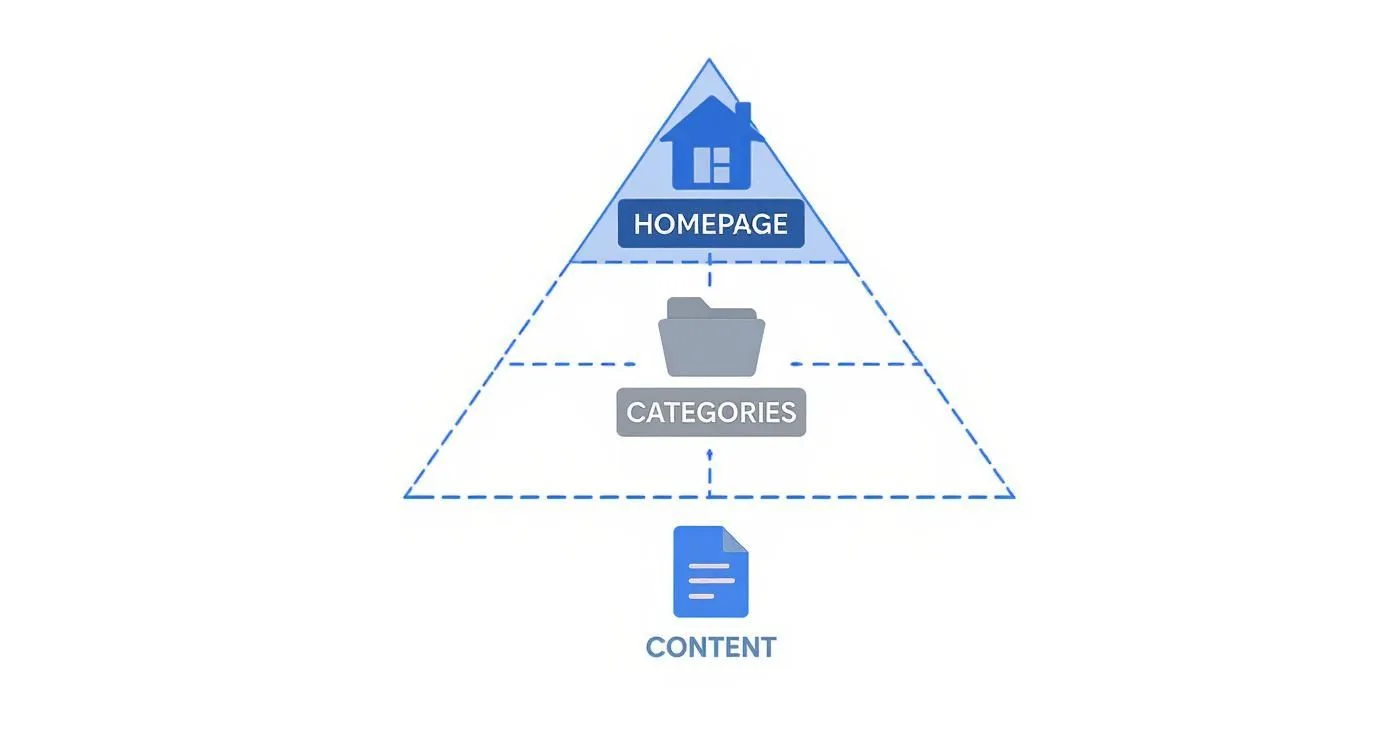
This simple visual shows how authority flows from the top down. Categories neatly organize individual pages, making sure nothing gets lost.
The Gold Standard: An E-Commerce Example
Think about your favorite online electronics store. Its structure is probably a great example of clarity. The homepage presents clear, top-level categories like "Laptops," "Smartphones," and "Accessories."
When you click "Laptops," you don't see every single laptop they sell. Instead, you get helpful subcategories like "Gaming Laptops," "Business Laptops," or "2-in-1s."
This structure is brilliant for a few reasons:
- It’s simple to navigate. A user can find what they want in just a few clicks. Less frustration means a better experience.
- The URLs are clean and descriptive. The URL mirrors the path (e.g.,
store.com/laptops/gaming-laptops). This makes sense to both people and Google. - Internal linking is built-in. Category and subcategory pages naturally link to product pages, spreading link authority and guiding crawlers through the site.
This logical flow makes it easy for customers to buy things and for Google to understand and rank each page for the right keywords.
The Pitfalls: A Fictional B2B Example
Now, let's imagine a B2B tech company, "InnovateSolutions," with a messy site. Their homepage is a jumble of links to "Services," "Solutions," "Industries," and "Resources," with no clear hierarchy.
A potential customer looking for "Cloud Migration Services" might have to click through "Solutions" > "IT Modernization" > "Infrastructure" > "Cloud Migration." That’s four clicks deep. This confusing structure creates immediate problems. Important service pages are buried, which tells Google they aren't very important.
Worse, the site has almost no internal links connecting its blog posts back to the services they sell. Those valuable articles become what we call orphan pages that harm your SEO. They get no link authority and are hard for crawlers to even find.
A confusing site architecture leads to a poor user experience. If a potential customer can't find your main service page quickly, they won't convert—they'll just leave.
To really see what to avoid, it's worth learning about some common website design mistakes that can hurt your SEO and frustrate users.
The difference is clear. One site guides users easily to their goal, while the other creates a frustrating maze. Once you learn to spot these patterns, you can build a structure that sets you up for success.
Alright, theory is great, but now it's time to get practical. Auditing your site architecture isn't about running a complex diagnostic script. It’s about looking at your own site to spot what's working and what's causing issues—for both your users and for Google.
Think of this as your simple guide to checking your current setup and making smart changes. We'll walk through a simple audit process to find common problems like confusing navigation, "orphaned" pages that are invisible to search engines, and messy URLs. By the end, you’ll have a clear, actionable plan.
Your Simple Four-Step Site Audit
You don't need a huge budget or a team of experts to get started. With a couple of simple tools, you can find the biggest opportunities to improve your site architecture and SEO.
- Visualize Your Current Structure: First, get a bird's-eye view. Use a tool like Screaming Frog or another site crawler to map out how your pages connect. This will quickly show you if you have a clean pyramid structure or a tangled mess.
- Hunt for Orphaned Pages: Orphaned pages are content with no internal links pointing to them. They're digital dead ends, invisible to both users and crawlers. Your site crawl report will flag these, telling you which valuable pages you need to link to.
- Analyze Your Click Depth: How many clicks does it take to get from your homepage to your most important service or product page? If it's more than three or four, you've buried it too deep. This signals to Google that those pages aren't a priority, which can hurt their ability to rank.
- Review Your URL Patterns: Take a look at your URLs. Are they clean and descriptive, like
yoursite.com/services/seo-audit? Or are they a jumbled mess, likeyoursite.com/p?id=123&cat=4? Readable URLs are a key part of good architecture; they give both people and search engines immediate context.
Prioritizing Your Fixes for Maximum Impact
Once you have a list of issues, it’s easy to feel overwhelmed. Don't. The key is to prioritize. Forget trying to fix everything at once and focus on the changes that will deliver the biggest results.
Think of this process like fixing a leaky pipe. You patch the biggest holes first to stop the major damage. You don't worry about the small drips until the flooding is under control. Focus on high-impact fixes that make your key pages more visible and improve the user journey.
Start by tackling these high-priority items:
- Simplify a Deep Navigation: If your most important pages are buried, it's time to restructure. Rework your main menu or add links from higher-level pages to pull them closer to the homepage.
- Build Links to High-Value Pages: Identify your most important service pages or blog posts. Then, find logical places to link to them from other content on your site. This is an easy win.
- Fix Inconsistent URLs: If you’re planning to relaunch a section of your site, use it as a chance to clean up the URL structure. Just make sure you set up 301 redirects from the old URLs to the new ones to keep any SEO value you've already built.
Implementing Changes Without Breaking Your Site
Making structural changes can feel a little scary. But a careful, step-by-step approach minimizes the risk.
Start small. Pick one section of your site, like a single product category or a blog topic. Make your changes there, then watch the results in Google Analytics and Search Console. Once you see what works, you can apply those lessons to other areas.
This whole process is a core part of technical SEO. For a complete guide, our SEO audit template can walk you through each step. And if you want to zoom out beyond just site structure, learning how to perform a comprehensive SEO audit will give you the full picture of your site's health. By turning your audit into a clear plan, you can make steady improvements that lead to real growth.
Essential Tools and Workflows for Founders
As a founder, your time and money are limited. You can’t afford a huge set of tools or a complex workflow. The key to handling your site architecture and SEO is to keep it simple, smart, and effective.
This isn’t about buying expensive platforms. It's about using a small but powerful toolkit that gives you the information you need to make the right moves, fast.
Your Lean Site Architecture Toolkit
Forget long lists of 50 different SEO tools. When it comes to maintaining a solid site architecture, you can get 90% of the value from just a few free or low-cost options. This is all you need to find problems, plan fixes, and monitor your site’s health.
- Google Search Console (GSC): This is your essential starting point. GSC is Google telling you what it thinks of your site. Use it to submit your sitemap, see which pages are indexed, and find crawl errors that point to architecture problems. It's free and the data comes directly from the source.
- Screaming Frog SEO Spider: When you need a deep dive, Screaming Frog is the top choice. The free version lets you crawl up to 500 URLs, which is usually enough for a startup. It's like an X-ray for your site, showing you the structure, finding broken links, and checking click depth.
- Visual Sitemap Generators (e.g., GlooMaps): Before you build or rearrange your site, you need a blueprint. A free tool like GlooMaps helps you quickly sketch out a visual sitemap. This forces you to think through your hierarchy and navigation before writing any code, saving you a lot of headaches later.
A Simple, Repeatable Workflow
Tools are only useful if you have a process. Instead of just reacting to problems, get into a simple quarterly routine to keep your site architecture in good shape. This proactive approach stops your site from becoming a mess as you add more content.
A repeatable workflow turns site maintenance from a chaotic fire drill into a predictable habit. By scheduling a simple audit every quarter, you catch small issues before they snowball into major structural problems that can damage your SEO.
Just follow this simple process every three months:
- Run a Fresh Crawl: Use Screaming Frog to get an updated map of your site. Watch for changes in click depth, new redirect chains, or broken links.
- Review GSC Coverage Report: Go to the "Pages" report in Google Search Console. Look for unusual spikes in “Crawled - currently not indexed” or “Discovered - currently not indexed.” These can be red flags that Google is confused about what's important on your site.
- Update and Resubmit Your Sitemap: After you publish new content, generate a fresh sitemap and submit it through GSC. This is like giving Google a new map to find your latest content.
- Prioritize One Fix: Seriously, just one. Don't try to solve everything at once. Find the single biggest problem from your audit—maybe a key page is buried too deep or you have a cluster of broken internal links—and focus on fixing that one thing. This makes progress feel manageable.
Your Top Site Architecture Questions, Answered
Founders often have a few key questions about site architecture. Let's clear up some of the most common ones so you can feel confident you're building your site on a solid foundation.
How Many Clicks Deep Should My Important Pages Be?
Your most valuable pages—the ones that drive your business—should be no more than three to four clicks from your homepage. This is what SEOs call a "flat" architecture.
Think about it from a user's perspective. If it takes seven clicks to find your pricing page, they'll probably give up. Google thinks the same way. The deeper a page is, the less important it seems. Keeping key pages near the top is an easy win for both user experience and rankings.
What’s the Difference Between a Sitemap and Site Architecture?
This one is a common point of confusion, but the analogy is simple.
Imagine your website is a house. Your site architecture is the actual layout—the rooms, doors, and hallways (internal links) that connect everything. It’s the structure a person walks through.
An XML sitemap is the blueprint you give to the building inspector (or a Google crawler). It’s just a list of all the rooms, making sure they don’t miss anything important.
Your architecture is how your site is actually built and connected. Your sitemap is the neat, organized list you give Google to make sure everything gets discovered. You need both to be in good shape.
How Often Should I Audit My Site Structure?
For a fast-moving startup, a quick audit every quarter is a great habit. You're always adding new blog posts, launching features, or tweaking service pages. It’s easy for things to get messy without you realizing it.
A quarterly check-in with a tool like Screaming Frog or by digging into Google Search Console is all it takes. This helps you spot problems like orphaned pages or increasing click depth before they hurt your SEO. It's simple, proactive maintenance that keeps your site healthy.
Ready to stop guessing and build a clear, prioritized plan to grow your startup's organic traffic? The team at SEO Roast provides founder-focused SEO audits and tools to turn search into a reliable growth channel. Get your product discovered.